
The AI use cases that work in email marketing today are practical ones: first-draft copy, subject line and preview text variants, alt text, and translation, each with a person checking the output before it's sent. Knak's 2026 research found that 70% of marketing teams have deployed AI in marketing production, yet only 29% call their adoption advanced, with AI embedded across the entire workflow.
The enterprise picture is sharper still, because among teams using AI, 64% use it for first-draft copy, while only 25% use it to build or code emails and landing pages. The same research found that 88% of teams say AI-generated content needs moderate or substantial editing before it's usable, and a 2025 IAB survey of US advertising executives found that over 70% of them have encountered an AI-related incident in their advertising efforts, including hallucinations, bias, or off-brand content.
The way to get value from AI is careful, considerate, and even restrained use that assists and improves your existing processes. AI isn’t a panacea for our marketing woes, but applied to your email marketing, it can be a huge advantage.
What are the most useful AI use cases in email marketing?
The most useful AI use cases in email marketing are first-draft copy, subject line and preview text variants, image alt text, translation and localization, and persona-based copy variants. In each one, AI produces options quickly and a person checks brand, accuracy, and fit before anything is sent.
We are already seeing a response to the power of AI in marketing through the adoption of processes like content supply chains, and each use case below fits into the larger AI marketing workflows in the enterprise. Engineering quality while using generative AI’s ability to produce quantity is key.
Use case | What AI does | What a person checks | Where it lives in Knak |
|---|---|---|---|
First-draft copy | Drafts body copy from a brief, a persona, and the campaign message | Claims, tone, and whether it sounds like your brand | Knak AI, from a brief |
Subject line variants | Writes several subject line options in a chosen tone | Accuracy against the email, brand voice, and length | The editor's subject line generator |
Preview text | Writes preheader text that pairs with each subject line | That the pair reads as one message without repeating itself | Knak's subject line and preview text generator |
Alt text | Describes images for screen readers and blocked-image views | That the description says what the image shows | Knak AI alt text in the editor |
Translation and localization | Translates and localizes email copy | Meaning, local idiom, and legal and product terms | Knak Translations, up to 75 languages |
Persona-based copy variants | Tailors one message to different audiences | That each variant stays on message and on brand | Your persona prompts, then Dynamic Content in Knak or your MAP |
Subject line generation
It's hard to overstate the importance of crafting catchy yet authentic subject lines, and Knak's 2026 research found that 48% of teams using AI already use it to generate subject line variants. As you've no doubt experienced, brainstorming subject lines can be both fun and daunting. The challenge compounds as you try to craft subject lines for dozens if not hundreds of emails in your marketing automation system.
Generative AI tools like ChatGPT can be used to analyze the contents of your email and craft a subject line. Knak builds subject line generation directly into the product, giving customers a list of variants to choose from, and Knak AI can also change the tone of an entire asset in one move.
If you don’t have access to a tool like Knak, you can still generate catchy subject lines using ChatGPT. While a basic prompt may work, I recommend providing additional instructions to ensure high-quality output. By specifying the tone, voice, and even the use of emojis, and by pasting in your brand voice guidelines, you’ll get a far better output. Here's an example of a subject line prompt that may work for you.
Subject line prompt example
Prompt Section | Content |
|---|---|
[Instructions] | Write me a compelling subject line that uses an emoji where the [brand voice guidelines] allow one and that accurately reflects the [content of the email]. You will also consider the [purpose] of the email, the [audience], and additional [context]. Follow the [brand voice guidelines] and never use the [banned language]. |
[Content of the Email] | {{ Your email copy goes here }} |
[Purpose] | {{ Your email's primary call to action or purpose }} |
[Audience] | {{ Who is your audience and any relevant information about them }} |
[Context] | {{ The campaign this email belongs to, and where it sits in the sequence }} |
[Brand Voice Guidelines and Banned Language] | {{ Your brand voice rules, two or three subject lines that worked, and the words your brand never uses }} |
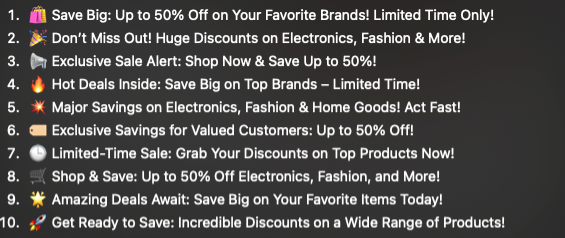
Example | Write me a compelling subject line that uses an emoji if our [brand voice] allows one and that accurately reflects the [content] of the email. You will also consider the [purpose] of the email, the [audience], and additional [context], and write in our [brand voice]. Give me 10 options. |
[Human Acceptance Check] | Before you use an option, confirm it matches the email, sounds like your brand, and avoids the banned list. |
ChatGPT's output
Preheader text generation
Preheader or preview text is often forgotten during the email content creation process, when you're focused on subject lines and body copy. Yet it’s a critical component of email marketing, shown right beside the subject line in most inboxes and featured prominently on mobile devices, where it gives the reader a second reason to open.
Thankfully, generative AI can help us craft winning preheader texts and coordinate them closely with subject lines. Together, the subject line and preheader make a one-two punch that captures your users’ attention and encourages them to open your email. If you’re using a tool like ChatGPT, make sure to include instructions to pair subject lines and preview text together as part of an enticing narrative.
Preheader text prompt example
Prompt Section | Content |
|---|---|
[Instructions] | Write me a preheader text that pairs well with the following subject line options. The preheader text should add context, complement the subject line, and entice the recipient to open the email. Ensure that the subject line and preheader work together as a cohesive narrative. Follow the [brand voice guidelines] and use only the [approved claims]. Keep the preheader text concise, no more than 100 characters. |
[Subject Line Options] | 1. "Your next campaign, live in days" 2. "How enterprise teams cut email build time" 3. "Live session: production without the developer queue" 4. "Thursday at 1:00 PM ET, see the workflow" 5. "Save your seat for our email production webinar" |
[Purpose] | Encourage marketing ops managers to open the email and register for a 45-minute live webinar on email production. |
[Audience] | Marketing operations managers and email marketers at enterprise SaaS and tech companies who build in Marketo or Salesforce Marketing Cloud. |
[Context] | A live webinar with a product walkthrough and Q&A. Registration is free, and the recording goes to everyone who registers. |
[Brand Voice Guidelines and Approved Claims] | {{ Your brand voice rules, and the only results and product claims the email may state }} |
[Example Pair] | Subject line: "Thursday at 1:00 PM ET, see the workflow" Preheader: "45 minutes, a live walkthrough, and the recording. Save your seat." |
[Human Acceptance Check] | Before you use a pair, read it in an inbox preview and confirm the two don't repeat each other and every claim is approved. |
Alt text generation
Accessibility is important, and features like alt text in an email go a long way toward ensuring everyone can enjoy your email content. Alt text is descriptive text that appears if images fail to render or if the user is using a screen reader to consume content. Email accessibility matters, and alt text is one of the simplest places to act on it as part of building accessible, compliant HTML email templates.
Alt text, then, is well worth crafting but, like preheader text, can often be overlooked during the content creation process. Generative AI tools have a remarkable ability to analyze images and provide descriptive text. Email tools like Knak make this easy: Knak AI generates alt text for your images right in the editor, as Knak's help center guide to email accessibility explains.
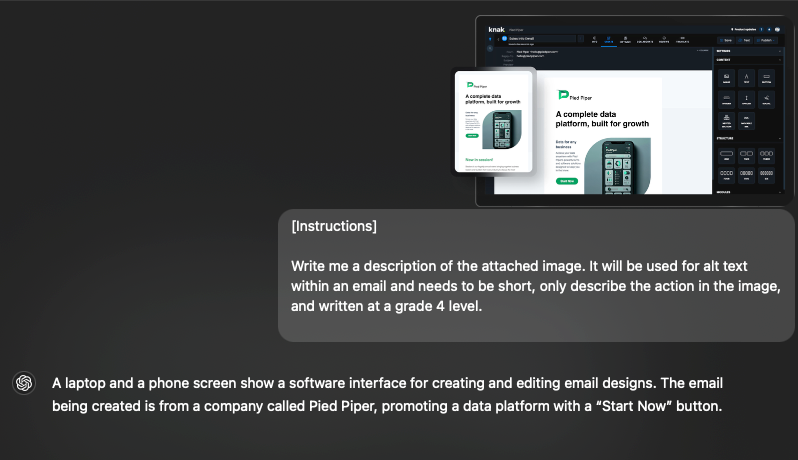
AI tools like ChatGPT can help you with this process as well. You can use a simple prompt and paste the image directly into the platform to get descriptive alt text.
Alt text prompt example
[Instructions]
Write me a description of the attached image. It will be used for alt text within an email and needs to be short, say what the image shows (including any text or the main point of a chart), and be written at a grade 4 level.
[Human Acceptance Check]
Before you use it, confirm the description matches the image and leaves out nothing a reader needs.
Copywriting assistant
While generative AI tools like ChatGPT can be fantastic copywriting assistants, it’s important to resist the temptation to rely too heavily on them for all your copy. It may just be me, but I find GPT’s default style easy to spot, whether it’s the same few stock verbs or idiomatic phrases like “in the constantly changing world of {insert industry here}.”
One way email marketers are using AI to help with copy is through integrated persona analysis with content creation. The idea is to provide the AI tool with information about your key persona and examples of content that have connected with that audience in the past. Then, you provide the tool with information about the marketing campaign and messaging you want to send via email.
From there, the AI tool can suggest an approach and help with a first draft, which speeds up iteration when you’re staring at the infamous blank page. The approach holds promise for personalization strategies, such as using Marketo’s dynamic content feature, by giving you ideas on how to tailor the same general message to different audiences.
Copywriting assistant prompt example
Prompt Section | Content |
|---|---|
Generalized Persona | Role: Marketing Manager Industry: SaaS or Tech Challenges: Too many hours lost to building emails by hand and waiting on reviews; wants to ship campaigns without the developer queue. Goals: Save time on routine campaign work, keep up with how marketing operations is changing, and send more personalized email. Tone Preference: Professional, informative, and approachable with a focus on practicality. |
[Instructions] | Write me a professional yet approachable email that introduces a marketing automation platform with AI built into the workflow to a Marketing Manager in the SaaS or tech industry. The email should explain how the platform simplifies campaign management and saves time on routine work. Follow the [brand inputs]. Include a call to action that encourages the recipient to book a demo to learn more about the platform’s benefits. |
[Email Content] | Hi [First Name], Building every campaign by hand takes hours your team doesn't have. [Platform Name] puts AI inside the campaign workflow, so you can draft emails and personalize them for each audience, with your team keeping the final say. Book a demo and we'll walk through one of your own campaigns. Best regards, [Your Name] |
[Purpose] | The purpose of this email is to introduce Marketing Managers to a marketing automation platform with AI built into the workflow and encourage them to book a demo to learn more about its time-saving features. |
[Audience] | Marketing professionals in SaaS or tech industries looking for tools that save time on campaign production. |
[Brand Inputs] | {{ Your brand voice rules, one or two emails your audience responded to, the claims you may make, and the words your brand never uses }} |
[Human Acceptance Check] | Before you use the draft, confirm every claim is approved, the copy sounds like your brand, and the call to action fits the campaign. |
Can AI write subject lines and preview text in your brand voice?
AI can write subject lines and preview text in your brand voice when it works from your brand guidelines, approved claims, and past emails instead of a blank prompt, writes the two as a pair, and leaves the final call to a person before anything syncs to your marketing automation platform (MAP).
In Knak, content generated by AI uses your brand's themes and design system, so the visual brand comes built in, while voice and claims depend on your inputs and the person who approves the email.
When you evaluate brand-aware AI generation in any email platform, ask:
- Where does brand context enter: your guidelines, themes, and past emails, or only the prompt someone types?
- Are the subject line and preview text generated together from the same brief?
- How does a reviewer reject an option, and is that decision recorded?
Spotlight: Email marketing and AI translations
AI translation may be among the most useful practical applications of AI in email marketing today. For businesses operating on the global stage, generating personalized and culturally relevant content in multiple languages is a challenge. Rather than clumsily copy-and-pasting into Google Translate, you can use AI translation tools to do this at scale.
Tools like Knak can help marketers translate content into up to 75 languages in minutes. This offloads the heavy lifting of translation to capable AI models, allowing your team to focus on reviewing and making minor tweaks. One of the strengths of these models is their ability to localize content, something many traditional machine translations struggle to do, allowing your team to create truly personalized content.
How Knak AI handles these use cases today
Knak is the agentic production layer for enterprise marketing, and its AI works inside the same system your team already uses to produce, review, and sync email. That system covers subject line and preview text generation, alt text, translations, and first drafts from a brief. AI output goes through the same brand controls and approval workflows as emails your team builds by hand, so marketers build on-brand emails without waiting on a developer.
Knak's AI page says teams ship campaigns 5 to 10 times faster, and at OpenAI, the marketing team gets AI drafts that are 80 to 90% complete from briefs, in minutes. To see it on your own brand, request a Knak demo.