Assessing ChatGPT, Claude, and Gemini for HTML Email Creation


We ran three leading consumer AI models through nine email coding tests. None of the nine outputs were production-ready. Not one.
Across ChatGPT, Claude, and Gemini, every model produced at least one email with a CAN-SPAM compliance gap. Every model defaulted to Times New Roman in Outlook on at least one prompt. Two of the three generated CSS that Yahoo and AOL silently threw out, leaving every recipient on those clients staring at unstyled email. The best score we recorded across the entire test was 24 out of 35, achieved by Gemini on the most complex prompt. The worst was 15 out of 35, from Claude on a newsletter design that broke entirely in Outlook for Windows.
The full average was 21.4 out of 35, or roughly 61%. If you graded these emails the way you'd grade a school assignment, every single one would come back with corrections.
This isn't a story about catching the models out. We used realistic prompts, standard email layouts, and the kinds of tasks marketing teams ask their tools to do every day. The goal was to see how much email knowledge is actually built into these models when you give them an everyday job with no scaffolding.
The broader context matters here. BCG's 2025 AI value gap research, based on a survey of 1,250 senior executives, found that only 5% of companies have reached the "future-built" stage for AI. 60% are laggards reporting minimal revenue or cost gains despite substantial investment. Marketing teams across the industry are betting on AI to compress their workload and accelerate output. Our test was an attempt to find out whether one specific bet — AI generating production HTML emails — actually pays off.
Top findings
1. Zero of nine outputs were production-ready. Across three models and three prompts, every single email had at least one blocker that would make it unsendable in a marketing operations context. The blockers ranged from missing CAN-SPAM elements to font rendering failures to layouts that broke entirely in major clients.
2. Six of nine emails had CAN-SPAM compliance gaps. Every model missed at least one of either a physical address or an unsubscribe link on the simplest prompt. By the time we reached the more complex prompts, compliance improved but never reached 100%. Two models forgot the physical address. One forgot the unsubscribe link entirely.
3. The browser preview is a trap. Every output looked acceptable in a browser preview. The problems only appeared once we opened the HTML in an email testing service and inspected it across real email clients. If a marketer's verification process stops at "looks fine in Chrome," every one of these emails would have shipped.
4. Outlook for Windows broke 8 of 9 emails. Times New Roman fallback fonts. Unsightly buttons in dark mode. Layouts blown out to 100% width. Inconsistent VML button support. Outlook is where AI-generated email goes to die, and Microsoft's own end-of-support documentation confirms that Office 2016 and 2019, which use the Word-based rendering engine that breaks most modern HTML, reached end of support in October 2025 yet are not blocked from connecting to Microsoft 365. Unsupported Outlook installs continue to receive email at significant scale.
5. Two of three models broke Yahoo and AOL completely. Both models included CSS comments or characters that Yahoo and AOL refuse to parse. Both clients responded by throwing out the entire CSS block, leaving recipients staring at unstyled HTML. This is not a partial degradation. It's a total styling failure for every Yahoo and AOL user on the list.
6. CSS handling was completely random. Some models inlined CSS inconsistently. Others didn't inline at all. The Gmail app on iOS with a non-Google address (a substantial chunk of any audience) strips styles in the head, which means uninlined CSS produces an unstyled email for those users. None of the three models handled this consistently across our test.
7. All three models picked Inter as their font for the most complex prompt. Without being asked. This is a small detail with a bigger implication: when models default to the same safe choice, they're reaching for whatever pattern dominates their training data, not making a contextual decision about what works for the brand or the audience.
How we tested
We tested each model at its standard paid consumer tier with extended thinking disabled. This reflects how most marketers would actually use these tools day to day, not how a developer might tune them.
Model | Version | Plan | Thinking |
|---|---|---|---|
Claude | Opus 4.6 | Claude Pro | Disabled |
ChatGPT | GPT-5.4 Pro | ChatGPT Pro | Standard |
Gemini | 3.1 Pro | Gemini Advanced | Default |
Model | Claude |
|---|---|
Version | Opus 4.6 |
Plan | Claude Pro |
Thinking | Disabled |
Model | ChatGPT |
|---|---|
Version | GPT-5.4 Pro |
Plan | ChatGPT Pro |
Thinking | Standard |
Model | Gemini |
|---|---|
Version | 3.1 Pro |
Plan | Gemini Advanced |
Thinking | Default |
Three prompts, increasing in complexity:
Prompt 1: A simple promotional email. A single-column promo for a fictional clothing store with a headline, body copy, and one CTA. The simplest test we could think of for a "real" email.
Prompt 2: A design newsletter with a web font. A featured article layout with a Google web font loaded via <link>, a featured story section with image placeholder, an "also in this issue" list, and a footer.
Prompt 3: A complex re-engagement email. Personalization placeholders, a three-column "what's new" feature section, a primary CTA, a secondary plain text link, a testimonial quote block, accessibility requirements, and a web font with a full fallback stack.
For each output, we captured the raw HTML, rendered it in a browser, and then opened it in an email testing service to see how it actually performed across the email clients marketing teams have to support: Outlook for Windows in multiple versions, the Gmail app on iOS and Android, Yahoo and AOL webmail, Apple Mail, Gmail webmail, and various combinations of light and dark mode.
We scored each output across seven categories on a 1-5 scale:
Category | What we measured |
|---|---|
Prompt adherence | Did the model follow the brief? |
Visual appeal | Is the design quality acceptable for production? |
Technical quality | Email coding fundamentals: VML, ghost tables, conditional styling |
Best practices | Fonts, fallbacks, preheader, responsive behavior |
Email rendering | How does it actually look in real clients? |
Accessibility | Alt text, table roles, language attributes, contrast ratios |
Compliance | CAN-SPAM requirements: unsubscribe, physical address |
Category | Prompt adherence |
|---|---|
What we measured | Did the model follow the brief? |
Category | Visual appeal |
|---|---|
What we measured | Is the design quality acceptable for production? |
Category | Technical quality |
|---|---|
What we measured | Email coding fundamentals: VML, ghost tables, conditional styling |
Category | Best practices |
|---|---|
What we measured | Fonts, fallbacks, preheader, responsive behavior |
Category | Email rendering |
|---|---|
What we measured | How does it actually look in real clients? |
Category | Accessibility |
|---|---|
What we measured | Alt text, table roles, language attributes, contrast ratios |
Category | Compliance |
|---|---|
What we measured | CAN-SPAM requirements: unsubscribe, physical address |
Maximum possible score: 35.
This was zero-shot prompting. We gave the models the task with no examples of good output, no system prompt, no email development context. We wanted to see how much email knowledge is actually built into these models out of the box, before adding any scaffolding.
Scores by prompt and model
Every score below is out of 35 total. None of the outputs cleared 25. None failed catastrophically (the models all "look right" enough in a browser to seem viable). They all sat in the 50-70% range, which is exactly the danger zone for production work: good enough to ship if you don't look closely, bad enough to cause problems when you do.
Prompt | ChatGPT | Claude | Gemini |
|---|---|---|---|
1 (simple promo) | 23 | 23 | 21 |
2 (newsletter + webfont) | 20 | 15 | 24 |
3 (complex re-engagement) | 20 | 23 | 24 |
Average | 21.0 | 20.3 | 23.0 |
Prompt | 1 (simple promo) |
|---|---|
ChatGPT | 23 |
Claude | 23 |
Gemini | 21 |
Prompt | 2 (newsletter + webfont) |
|---|---|
ChatGPT | 20 |
Claude | 15 |
Gemini | 24 |
Prompt | 3 (complex re-engagement) |
|---|---|
ChatGPT | 20 |
Claude | 23 |
Gemini | 24 |
Prompt | Average |
|---|---|
ChatGPT | 21.0 |
Claude | 20.3 |
Gemini | 23.0 |
ChatGPT was the most consistent. Claude was the most variable, with the worst score on the test (15 on the newsletter prompt) and a tendency to make ambitious design choices that broke in Outlook. Gemini was the strongest on average, particularly on the complex prompt, but it freely used unencoded emojis and special characters that can cause downstream issues in marketing automation platforms.
The pattern that matters more than which model "won" is that no model broke 70%. The best result we got was 23/35, which is a D+. For every single output, you would need a full QA cycle and material rework to make it sendable.
The compliance gap
Compliance was the most surprising failure mode in our test, because compliance is the simplest thing for a model to get right. CAN-SPAM has been the law since 2003. Every email needs an unsubscribe link and a physical postal address. There's no ambiguity, no edge case, no "depends on the audience." It's two elements in the footer, and they need to be there.
Two of three models forgot the physical address on the simple promotional email. One forgot the unsubscribe link entirely. Compliance improved on the more complex prompts, but it was never automatic. If you generate an email with one of these models and don't manually verify the footer, you may be shipping a CAN-SPAM violation.
Enforcement is real. In August 2024, the FTC obtained a $2.95 million civil penalty against Verkada, the largest CAN-SPAM penalty ever recorded. Verkada had sent more than 30 million commercial emails over three years without valid opt-out mechanisms, physical postal addresses, or honoring unsubscribe requests. The violation pattern in that case is exactly the kind of output our test produced from the consumer LLMs: missing unsubscribe links, missing physical addresses, and no awareness that these omissions create legal exposure.
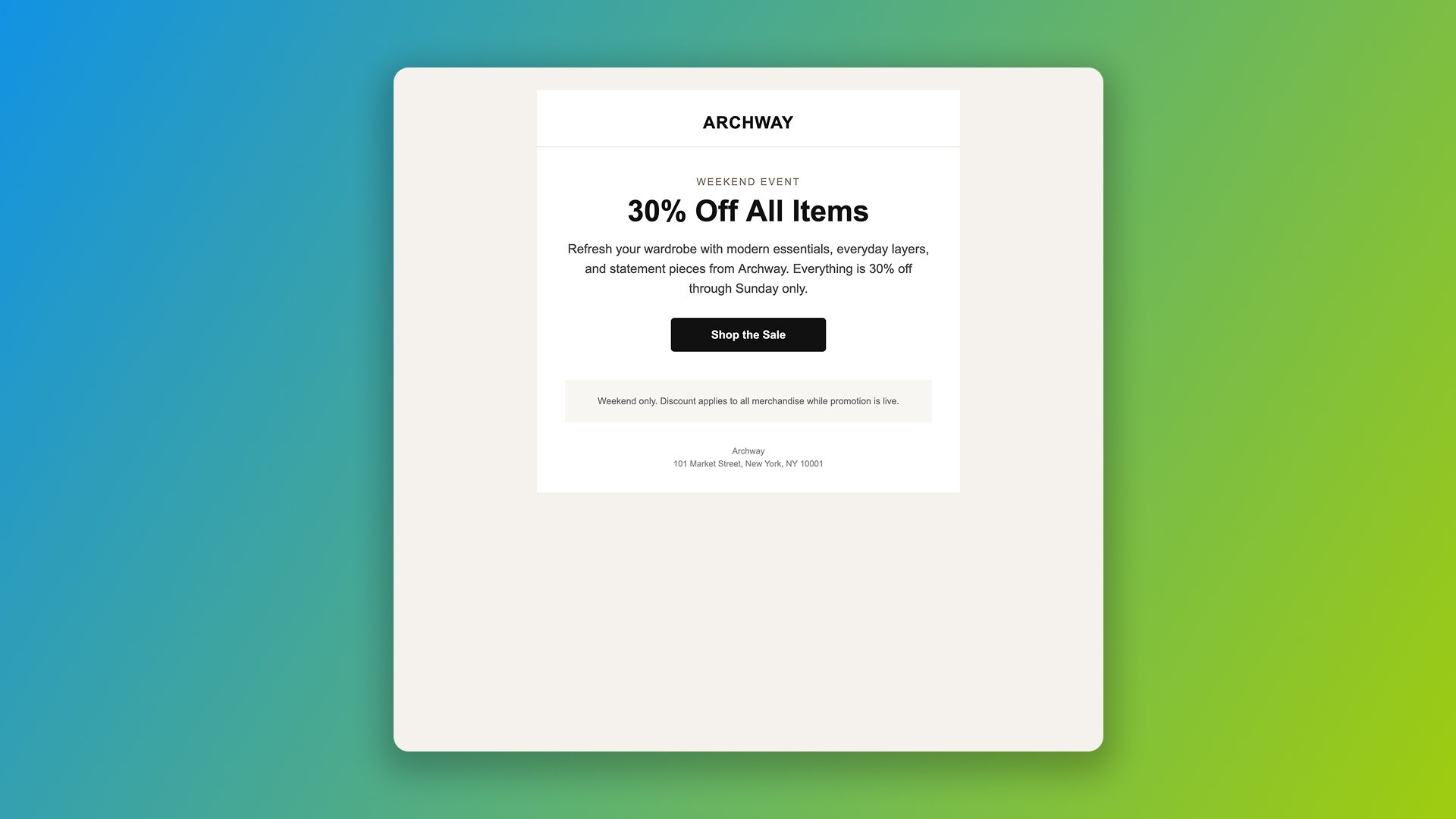
ChatGPT included a physical address but no unsubscribe link in Prompt 1, a CAN-SPAM violation.
The pattern is troubling because compliance is a static requirement. There's nothing about the prompt or the email's complexity that changes whether you need an unsubscribe link. The models simply don't treat compliance as table stakes. They treat it as an instruction you have to remember to give, every time, on every prompt.
For a marketing operations team running dozens of campaigns a month, this becomes a workflow tax. Every prompt needs the compliance reminder. Every output needs a manual check. The "save time with AI" pitch turns into "save time on drafting, lose time on QA," which is not the trade most teams were expecting.
Rendering failures by email client
The browser-to-inbox gap is where the test results turn from "imperfect but workable" to "unsendable." Every email that scored well in a browser preview produced multiple rendering failures once we opened it in real email clients.
Outlook for Windows
Outlook is where the failures cluster. Eight of nine emails had at least one Outlook rendering issue. The most common:
Times New Roman fallback. When a model specifies a font stack incorrectly (or doesn't specify it at all), Outlook for Windows defaults to Times New Roman. Every model produced at least one email with this issue. On the newsletter prompt, where a web font was explicitly requested, all three models failed to specify the fallback stack correctly for Outlook.
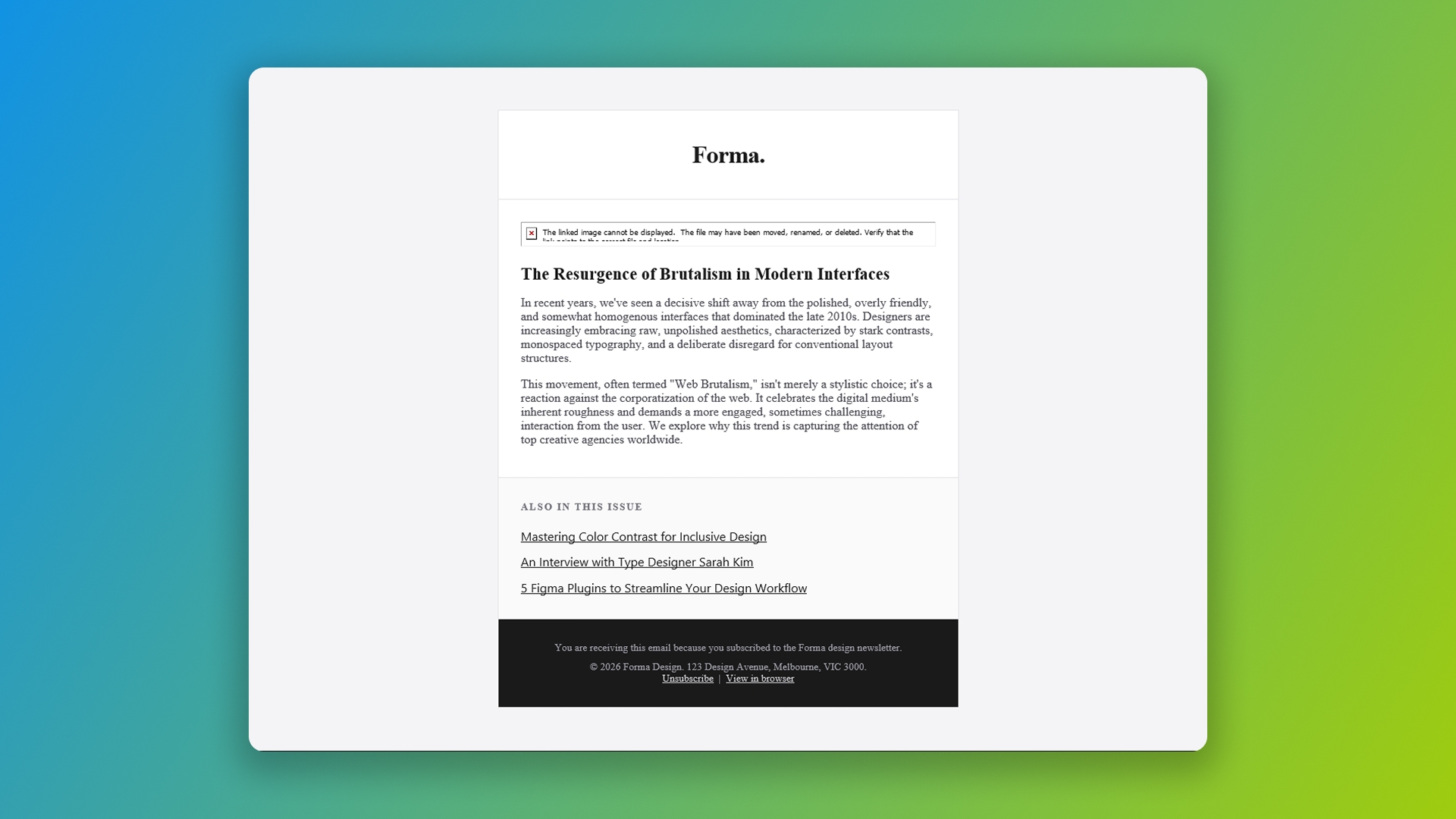
Gemini's design newsletter falls back to Times New Roman in Outlook 2016 (120 dpi), Windows 10. The webfont was requested in the prompt and loaded correctly in modern clients, but the Outlook fallback was missing.
Width attributes. Claude consistently struggled with setting the email width, in some cases using the HTML width attribute on the table rather than CSS. This causes the email to stay rigid at 600px on Outlook for Windows high-DPI screens, while the rest of the content scales up around it, producing a squished layout.
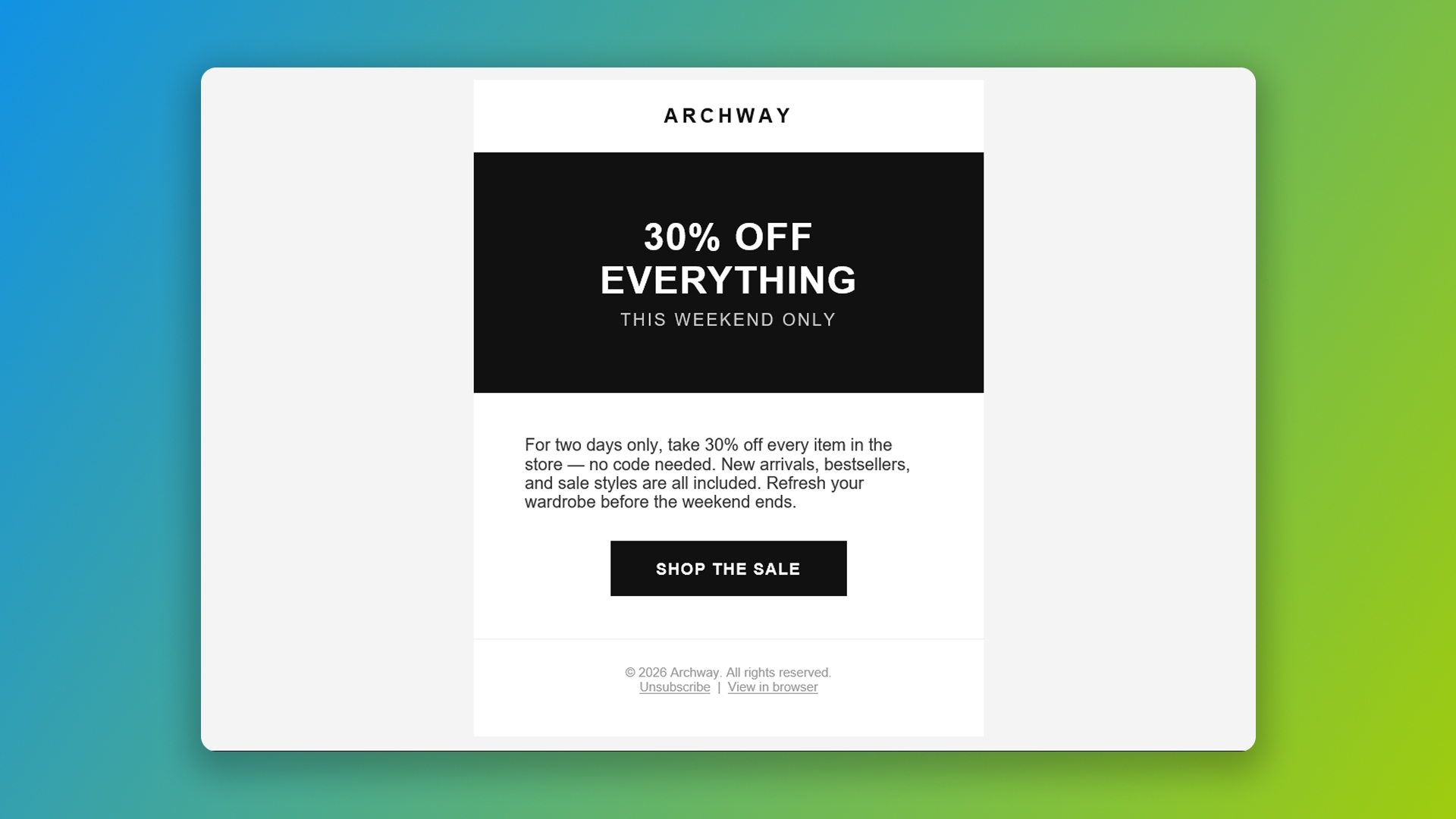
Claude's promotional email squished inside a fixed 600px table width on Outlook 2016 (120 dpi), Windows 10. The HTML width attribute doesn't scale on high-DPI screens.
In another example, Claude used a div-based layout, but provided no fallback for Outlook.
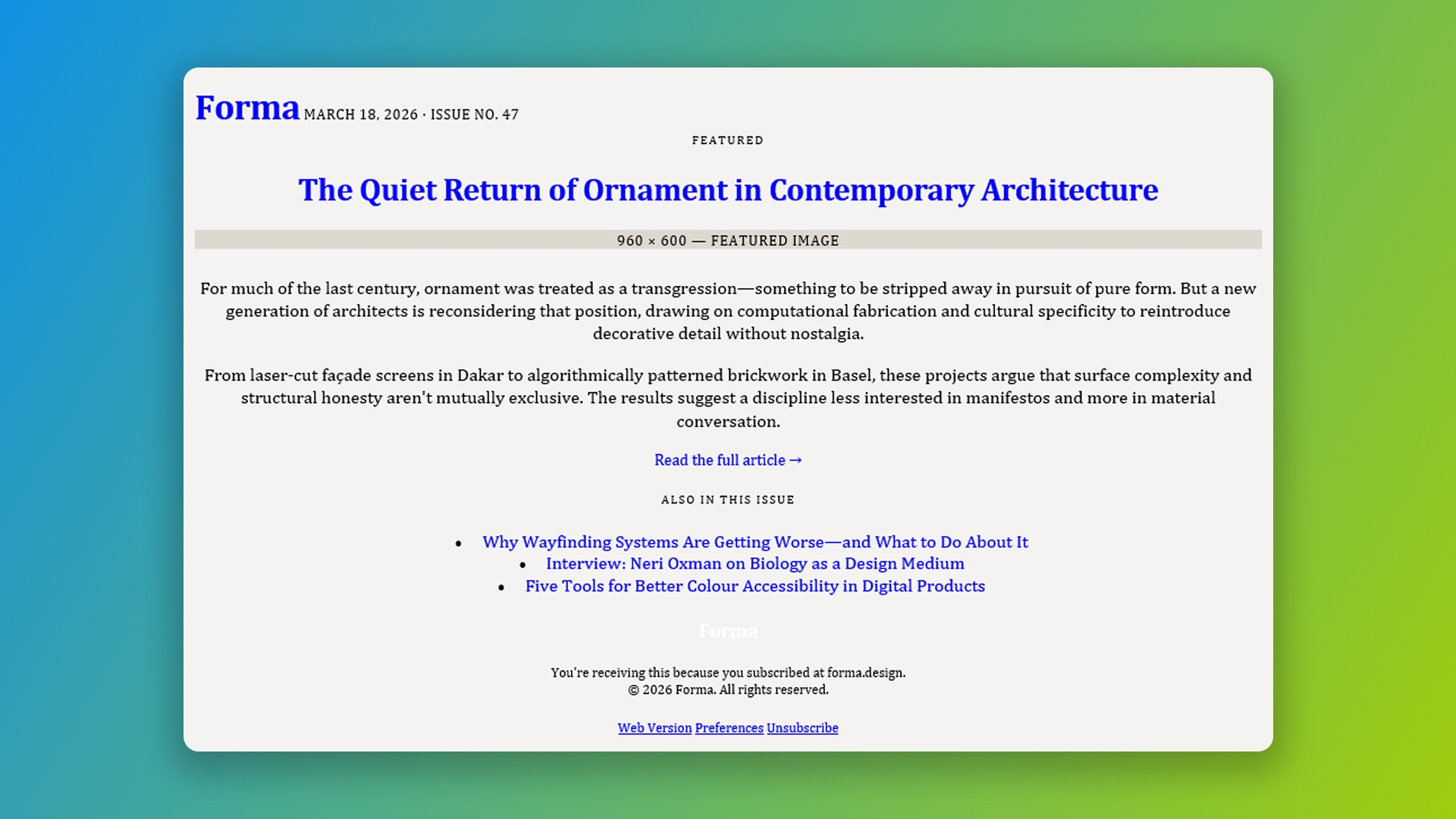
Claude’s newsletter using divs for layout on Outlook Microsoft 365, Windows 11. Widths on divs are ignored in Outlook, causing the layout to extend to the edges of the window.
ChatGPT also struggled with container widths, attempting to set max-width on a table, which is not supported in Outlook 2016.
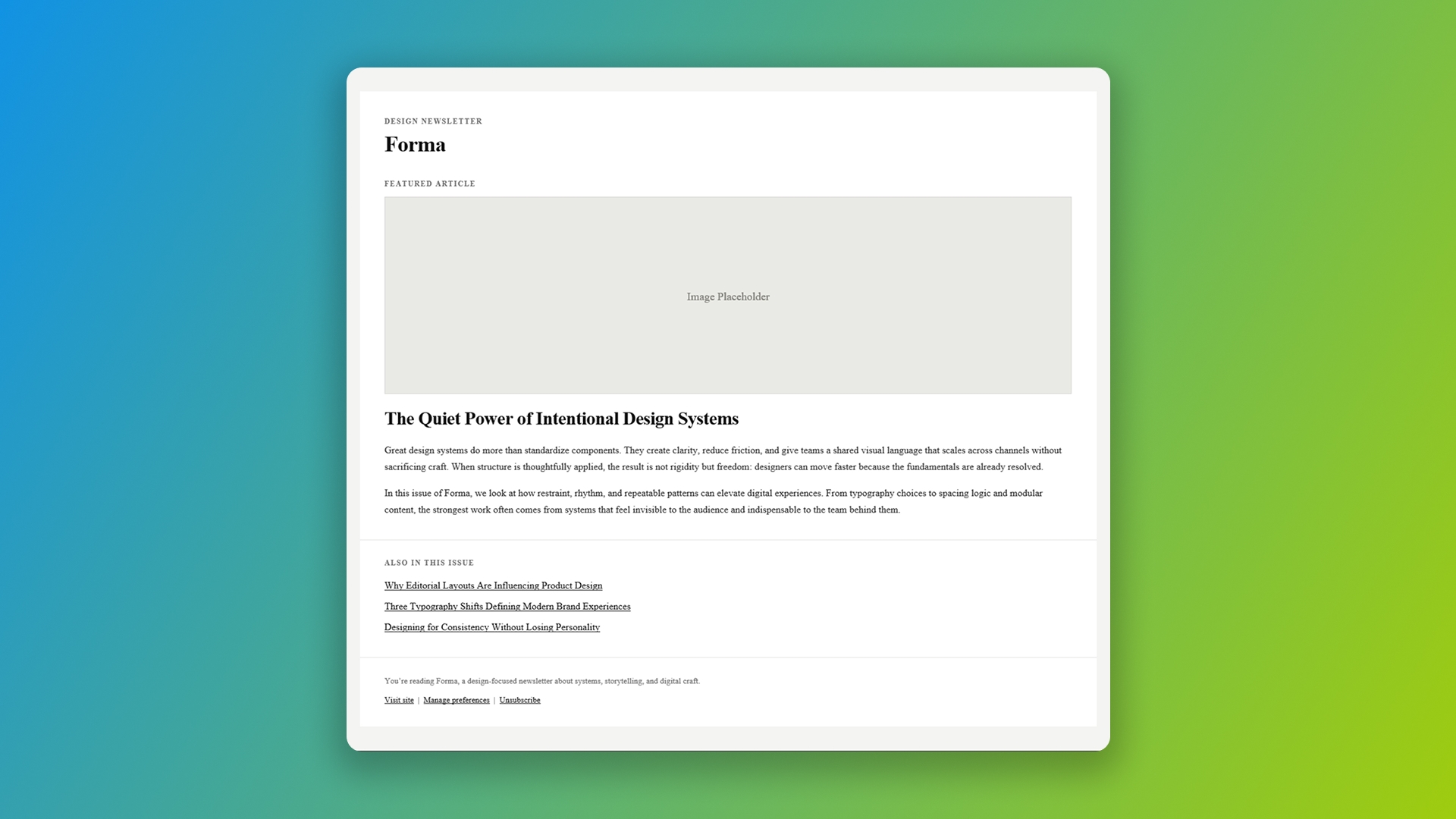
ChatGPT’s newsletter using max-width on a table, which is not supported in Outlook 2016. With no fallback specified, the layout extends to the edges of the window.
Border-radius failures. Outlook Classic doesn't support border-radius. Claude placed a CTA button inside a cell with a dark background and rounded corners, which created an unsightly white edge poking out from behind the button in Outlook Dark Mode.
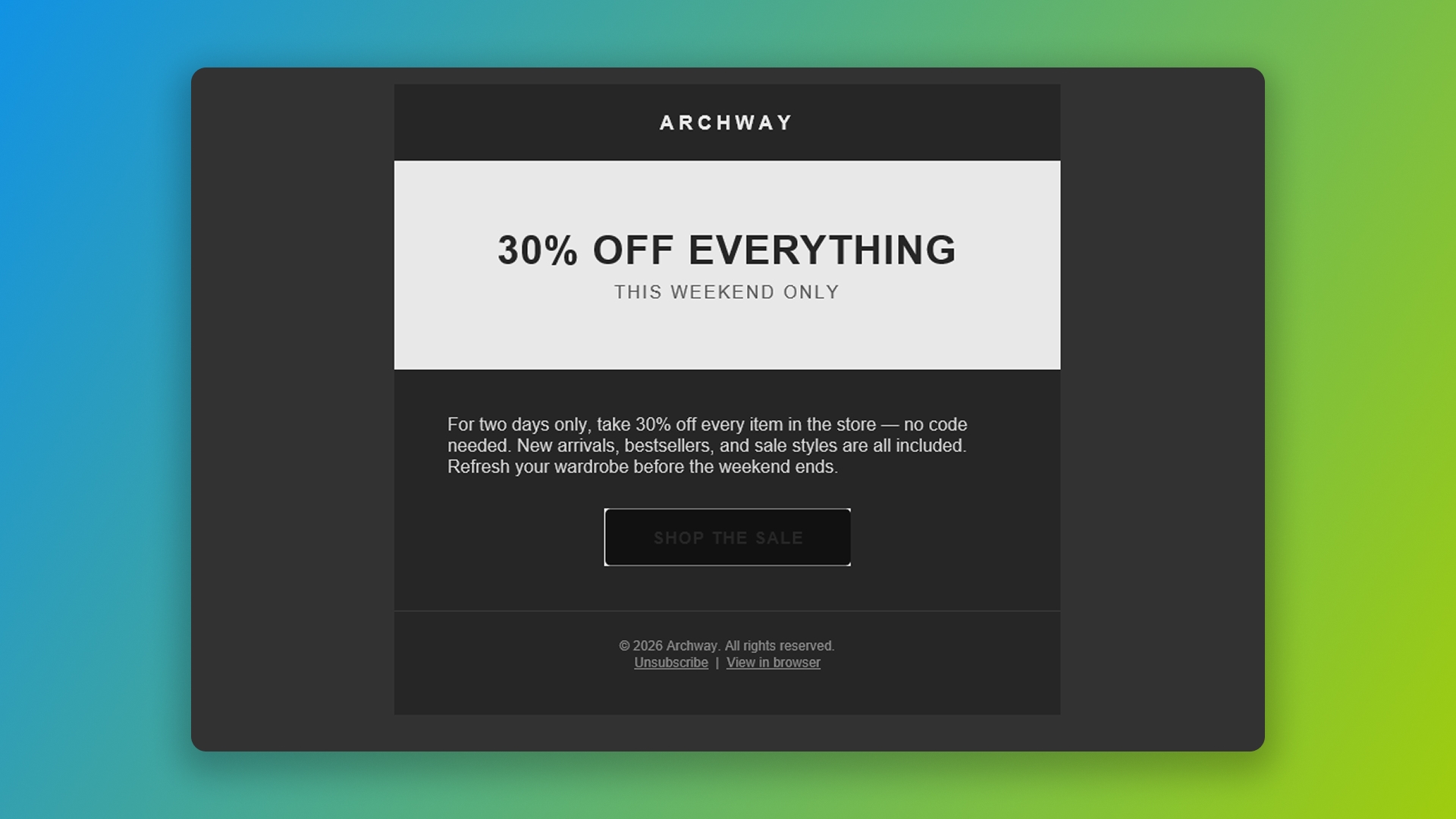
Claude’s CTA button sits on top of an unsightly white box in Outlook 2021 dark mode. The CTA text has also inverted, making it hard to read.
VML button inconsistency. Two of three models used VML buttons (the standard Outlook accommodation for rounded buttons) on the simple prompt. Only one used them on the complex prompt. There's no consistency across prompts or even within the same model's outputs.
Yahoo and AOL webmail
Yahoo and AOL are the second-most-broken clients in our test, and the failure mode is dramatic. Two of three models on the complex re-engagement email produced CSS that Yahoo and AOL silently threw out, resulting in completely unstyled emails for every recipient on those clients.
The cause is small and specific. Yahoo and AOL are sensitive to certain characters in CSS. Comments inside style blocks, certain symbols, and unencoded special characters can trigger both clients to discard the entire CSS block as invalid. Two of three models freely used CSS comments.
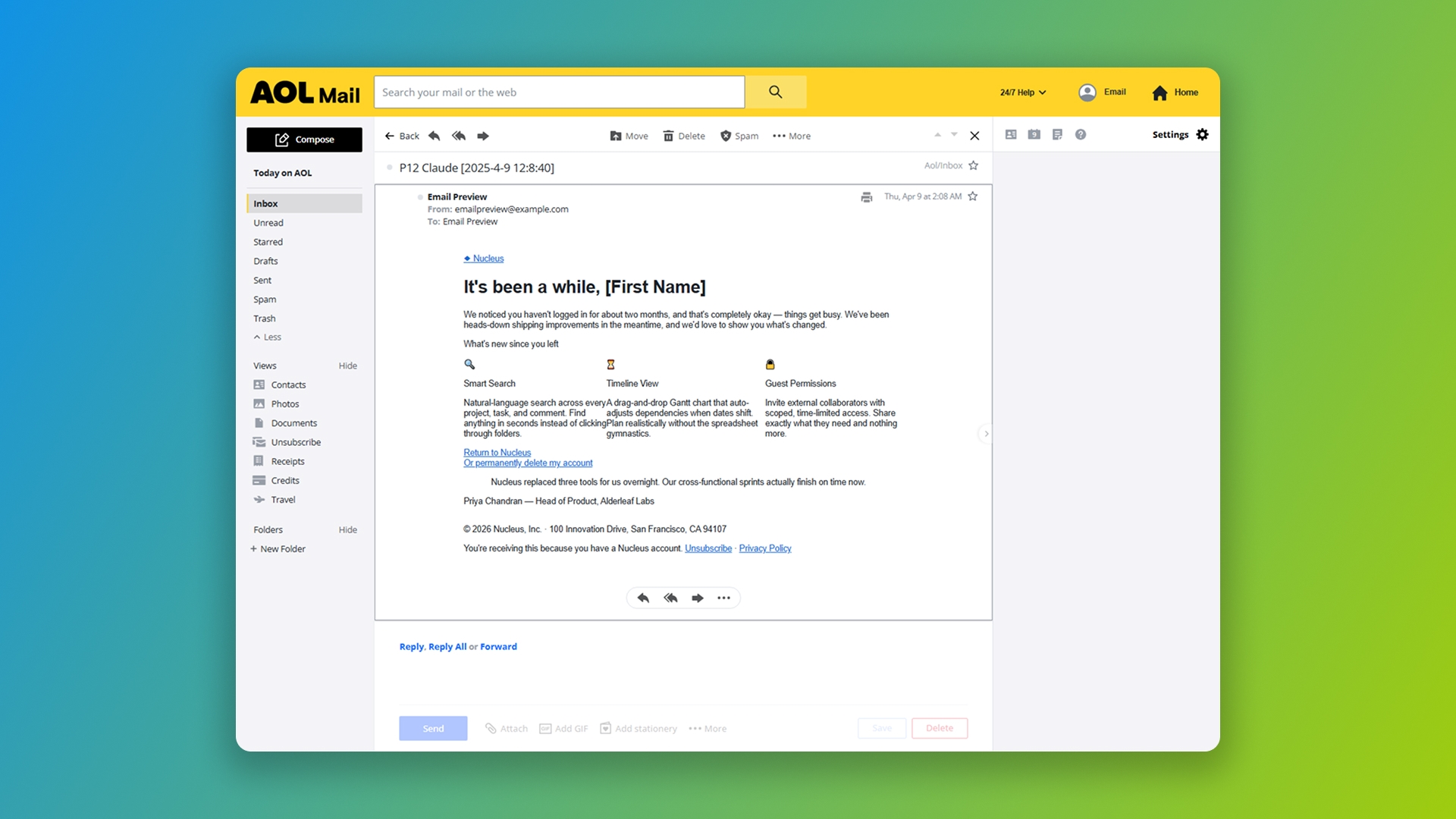
Claude's complex re-engagement email in AOL Mail. The first line of the CSS block contains characters AOL refuses to parse, so the entire block is discarded and recipients see an unstyled HTML document.
This is the worst class of failure in the entire test, because it's invisible. The browser preview looks fine. The Outlook render looks fine. The Gmail render looks fine. Then a chunk of your audience opens the same email and sees an unstyled document with no branding, no layout, and no clear CTA.
Gmail app with non-Google addresses
The Gmail app on mobile renders email differently when the user has a non-Google email address connected (Outlook, Yahoo, etc.). It strips <style> tags from the head, which means any CSS that wasn't inlined is gone.
This affects more users than most marketers realize. The Gmail app is the most popular mail app on Android and the default mail client on Google Pixel devices. Anyone who installed it and added multiple accounts falls into this category. For B2B marketing audiences, this can be a sizeable portion of opens.
Two of three models on the newsletter prompt produced emails that arrived completely unstyled in the Gmail app with non-Google accounts because their CSS wasn't inlined.
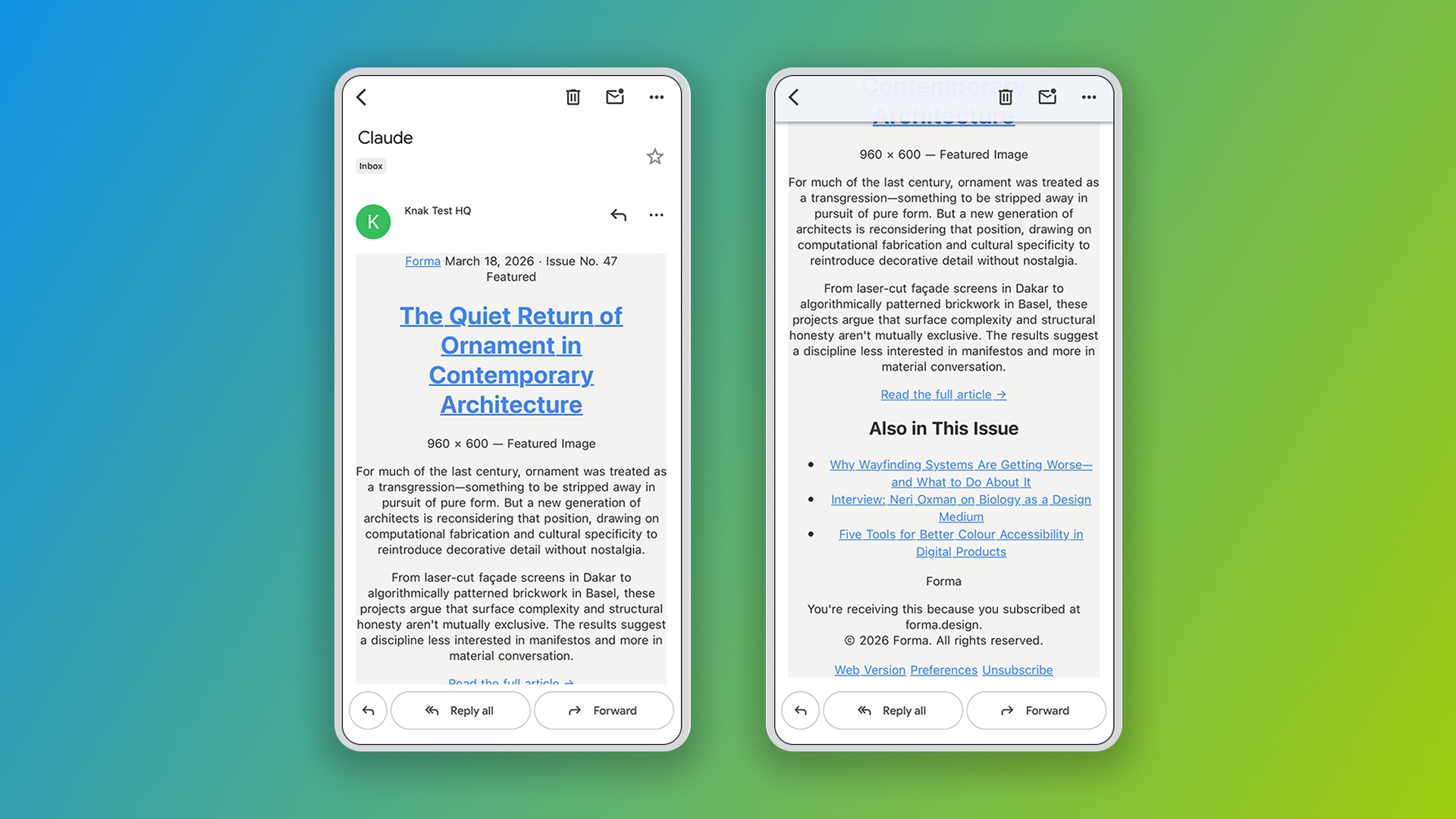
Claude's design newsletter in the Gmail app on iOS with a non-Google account. No CSS inlining means the email arrives as plain HTML, with blue links and default browser styling.
Mobile rendering and column misalignment
The complex re-engagement email asked for a three-column "what's new" section that stacked on mobile. All three models produced misaligned columns when they stacked, because each column had different padding values that were preserved when the layout collapsed.
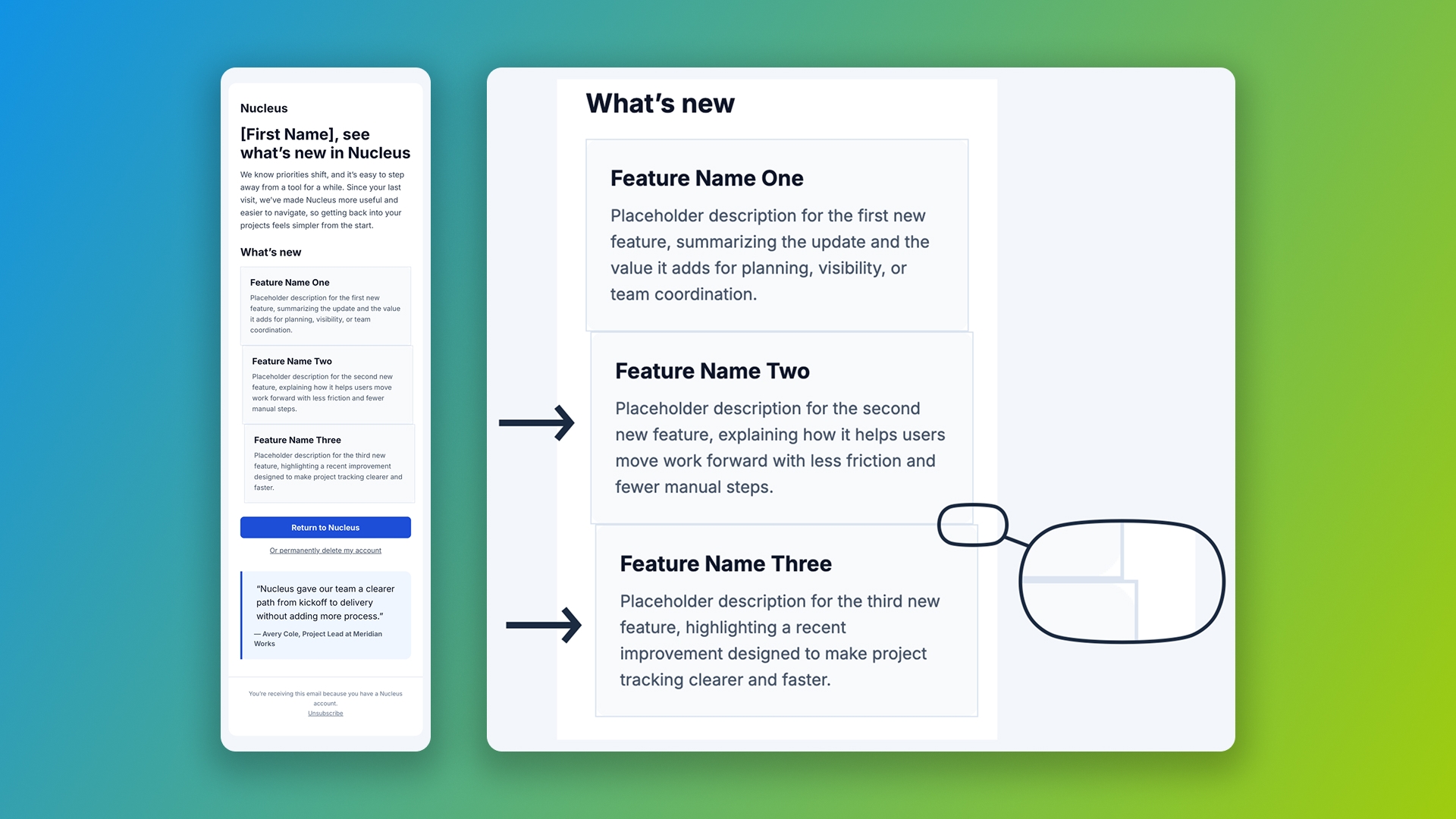
ChatGPT's three-column section on iPhone 15 Plus, iOS 17. Each column has different padding values, so when they stack vertically, the content edges don't align.
This is a small issue compared to broken Outlook layouts, but it's a quality signal. Production-ready email pays attention to alignment when content reflows. AI-generated email rarely does.
Why LLMs struggle with email HTML specifically
The reason this happens is structural, and it explains why no amount of better prompting will fully solve it.
In web development, an LLM can generate HTML, run it through validators and standards checkers, and use the feedback to self-correct. The standards are clear and enforceable. Browsers converged on shared behavior years ago. The W3C validator can reliably tell you whether a page is valid. AI-generated code has gotten dramatically better at web tasks specifically because models have feedback loops to learn from. The Stanford AI Index 2025 documents this clearly: on SWE-bench, a benchmark for resolving real software engineering issues, AI systems went from solving 4.4% of problems in 2023 to 71.7% in 2024. The improvement is genuine and measurable.
Where it gets harder is in domains without clear feedback loops. The same Stanford AI Index references a controlled study of AI legal research tools: even with retrieval-augmented generation, Westlaw's AI tools hallucinated over 34% of the time, and other legal AI tools were wrong more than 17% of the time. These are tools built specifically for the legal domain, with curated training data and structured retrieval systems. They still hallucinate at substantial rates because legal reasoning has the same problem as email rendering: there's no automated way for the model to verify whether its output is correct.
Email has even less standardization than law. Nearly two decades ago, the W3C convened a workshop in Paris specifically because HTML email rendering lacked the standards that had stabilized web browsers. The workshop identified the core problems: client diversity, inconsistent CSS support, security-driven HTML sanitization, and architectural complexity in webmail clients. Eighteen years later, those problems remain unsolved. There is still no comprehensive validator that catches every rendering issue across every inbox. Every major email client renders HTML differently, with its own quirks, supported features, and silent failure modes. The only way to really know whether an email works is to send it through a testing service and visually inspect the result across dozens of client and device combinations.
What the models have to learn from is whatever email code happens to exist on the public web. The public web is full of broken email examples, code that worked in 2020 but stopped working after the last Gmail update, and patterns that never worked correctly in the first place. Every model in our test was confidently reproducing those patterns because that's what it had seen.
This is also why every serious AI-driven email tool relies on intermediate frameworks like MJML or react-email rather than asking an LLM to generate raw email HTML directly. Those frameworks give the model a smaller, constrained vocabulary to work with, and the framework handles the translation to actual email HTML. It's a workaround for the underlying problem: the models don't have the email expertise built in, and there's no reliable way for them to acquire it on their own.
What about frameworks, skills, and custom prompts?
The most common response to results like these is reasonable: of course you have to teach the LLM how to do email first. Add a system prompt. Use a framework. Build some custom skills. Then it works.
That's true in a sense. With enough scaffolding, the right framework, a curated component library, and ongoing maintenance, you can get LLMs to produce reasonable email output. But that response understates how much work the scaffolding takes and who has to do it.
You need email development knowledge to build the framework integration correctly. You need to understand the rendering quirks well enough to know which guardrails matter. You need to maintain those guardrails as new model versions ship and behavior drifts. You need to handle the gaps in whatever framework you choose, because none of them solve every email rendering problem. MJML still has rendering gaps. React-email lacks pre-built components and has limited native Outlook support. And you need an ongoing QA process to catch the failures when something does break, because something always does.
This is exactly the work that email developers and rendering engineers have been doing for years. The tools have changed. The work hasn't gone away. For organizations serious about email at scale, the question isn't whether AI can generate HTML. The question is whether the people generating that HTML have the expertise to make it production-ready, and whether the system they're using can guarantee consistent output across thousands of emails over months and years.
Where structured content changes the equation
There's a different way to approach this problem, and it doesn't start by asking an LLM to produce raw HTML.
The underlying issue in our test is that the models were treating email HTML as a code generation task. Every output started from a blank page and tried to assemble valid email HTML from training data, with no shared vocabulary, no rendering pipeline, and no constraints to keep the output on the rails. The result was code that looked like email but failed in the ways that matter.
Knak takes a different approach. Every email is stored as a structured blueprint of components rather than as raw HTML. A button is labeled as a button. A section is labeled as a section. Brand rules are encoded as constraints, not as suggestions in a prompt. When AI operates within that structure, it doesn't have to solve the rendering problems, because the platform handles them automatically through a rendering pipeline that's already been validated against every major email client.
This is why Knak's AI can produce reliable, production-ready output even though the underlying challenge is the same one that broke the consumer models in our test. The AI is working with structured content and a known set of constraints, not trying to reverse-engineer email rendering from first principles. The hard rendering problems are solved by the infrastructure underneath, and the AI's job is to make decisions within that structure rather than reinvent it on every request.
It's also why this same approach works whether a human marketer or an AI agent is at the controls. Same governance, same brand controls, same compliance checks. The platform doesn't care who's driving the workflow.
For teams evaluating AI for email, the practical question is which problem you actually want to solve. If you want AI to draft copy, brainstorm subject lines, or sketch layout ideas, the consumer LLMs are useful for that. If you want AI to produce production-ready emails that render correctly across every client, work for users on Outlook 2016, comply with CAN-SPAM, and maintain brand consistency at scale, you need more than a prompt. You need a system designed for the job.
Limitations
This test has a deliberate scope. Worth being clear about what it does and doesn't show.
This is zero-shot prompting. We gave each model the task with no system prompt, no examples, no email development context. The results show how much email knowledge is built into the models out of the box. With significant scaffolding, results would be different. They would also require significantly more setup and ongoing maintenance.
Three models is a sample. We tested the three leading consumer LLMs at their standard paid tiers. Other models, other configurations, and especially other thinking modes would produce different results. The pattern across these three is consistent enough to suggest the issue is structural to current LLMs, but it isn't a comprehensive evaluation of every AI tool on the market.
Our scoring is opinionated. We evaluated each output the way an email developer would evaluate code coming from a junior member of the team. Other rubrics would produce different scores. The categories we used (prompt adherence, visual appeal, technical quality, best practices, rendering, accessibility, compliance) reflect our view of what production-ready email requires. A team optimizing for different criteria might score these differently.
Rendering tests are point-in-time. Email clients change. Gmail, Outlook, and Yahoo all push updates that affect rendering behavior. The specific failures we documented in this test reflect the state of those clients at the time of testing. Some of these issues will resolve as clients update. Others will be replaced by new issues we couldn't anticipate.
This isn't a compliance audit. We checked for CAN-SPAM basics. We didn't check for GDPR compliance, accessibility certification, deliverability scoring, or any of the other categories that matter for production email programs. A real compliance review would surface additional issues.
What this test does show: the models we tested don't have enough built-in email expertise to produce production-ready output without significant additional scaffolding. The patterns are consistent across models and across prompts. The implication is that "AI writes the email" is not yet a reliable workflow for marketing teams that ship at scale.
See how Knak's AI works with structured content instead of raw HTML.
Update (April 2026): Claude Opus 4.7 tested
Anthropic released Claude Opus 4.7 on April 16, 2026, a few weeks after our original test. We re-ran the same three prompts through the new model under the same conditions: Claude Pro tier, adaptive thinking disabled, fresh session with no memory or context from the previous runs.
Opus 4.7 comes out on top of all models overall, but only by a single point. It scores 70 out of 105 across the three prompts, edging out Gemini (69) and improving on Opus 4.6 (61).
| ChatGPT | Gemini | Claude Opus 4.6 | Claude Opus 4.7 |
|---|---|---|---|---|
Simple promo email | 23 | 21 | 23 | 20 |
Newsletter with webfonts | 20 | 24 | 15 | 26 |
Complex re-engagement | 20 | 24 | 23 | 24 |
Total (out of 105) | 63 | 69 | 61 | 70 |
| Simple promo email |
|---|---|
ChatGPT | 23 |
Gemini | 21 |
Claude Opus 4.6 | 23 |
Claude Opus 4.7 | 20 |
| Newsletter with webfonts |
|---|---|
ChatGPT | 20 |
Gemini | 24 |
Claude Opus 4.6 | 15 |
Claude Opus 4.7 | 26 |
| Complex re-engagement |
|---|---|
ChatGPT | 20 |
Gemini | 24 |
Claude Opus 4.6 | 23 |
Claude Opus 4.7 | 24 |
| Total (out of 105) |
|---|---|
ChatGPT | 63 |
Gemini | 69 |
Claude Opus 4.6 | 61 |
Claude Opus 4.7 | 70 |
The overall improvement hides what's actually happening between versions. Opus 4.7 fixes Opus 4.6's worst failure (the newsletter prompt jumps from 15 to 26, an 11-point improvement) by producing a more email-appropriate layout with better CSS inlining and compliance that now includes a physical address. But it trades away wins Opus 4.6 had in other areas. The simple promotional email regresses from 23 to 20 because 4.7 drops the VML button treatment for Outlook and the XML namespace declaration that 4.6 handled correctly. The complex re-engagement prompt barely moves (23 to 24).
The pattern matters more than the score. Opus 4.7 is a sideways step, not a clear upgrade. It produces better results in some areas, introduces new failure modes in others. Compliance still isn't treated as non-negotiable: the simple promotional email still ships without a physical address, the same CAN-SPAM gap the original test documented. New quirks appear: button text becomes underlined in the Gmail app on iOS, buttons misalign on mobile even in browsers, unencoded copyright symbols get introduced in the HTML body.
Three implications for marketing operations teams tracking AI for email production:
Improvement between model versions is non-linear. A new model doesn't simply replace the old one with a better version. It trades failure modes. The VML button support that Opus 4.6 handled correctly disappeared in 4.7. Teams can't assume that what worked with one model version will keep working with the next.
Compliance gaps persist across versions. One model version later, the same basic CAN-SPAM failure shows up. Compliance requires a system that enforces it, not a model that remembers it.
Overall scores are narrowing but the ceiling hasn't moved much. Opus 4.7 at 70 out of 105 (67%) is the highest any model has scored in our tests. The best possible score on a single prompt remained 26 out of 35 (74%), the same as Gemini's best in the original test. The top of the distribution isn't rising fast, even as different models take turns at the top.
The underlying argument from the original test holds. Reliable email production requires the structural layers underneath the model: brand context access, rendering pipeline, compliance enforcement, and governance. Those layers don't change when Anthropic, OpenAI, or Google ships a new model. The production system absorbs the volatility that model updates introduce.