
Webinars are one of the most engaging and effective demand generation strategies in the digital marketing toolkit. They can drive engagement with your products, inform your audience of important trends, and even teach new skills. Perhaps the most important byproduct of webinars is that they can create a connection with potential customers, leaving a positive impression of your brand at the same time.
But, you have to get them to come to your webinar first.
Enter the workhorse of the webinar: the email sequence, a.k.a. the webinar campaign. Email is not just one channel among many here. Livestorm’s 2026 benchmark data shows that 86.3% of webinar registrations come through email, nearly double any other channel. The sequence needs to tell your audience what your webinar is about in an enticing way, provide all the important details for attending, keep them excited as the event nears, ensure they actually show up, and then follow up in a way that they’ll look forward to. That’s a fair bit of responsibility for a few emails. So it’s worth it to spend some time here to make sure every email ticks every box. We’ve got plenty of design inspiration for you in our Email Gallery, including a dedicated set of webinar email examples. In this post, we’re going to walk through the full sequence: the types of webinar emails you should be building, when to send each one, and a copy-paste template for every email in the campaign.
The 7 Types of Webinar Emails in a Sequence
Webinar emails can be broken out into 7 types, in the order your audience meets them:
- Invitation Email
- Registration Confirmation Email
- No Open/No Click Reminder Email
- Day Before Reminder Email
- Last-Minute or “Starting Now” Email
- Follow-up or Thank You Email
- Feedback or Survey Email
Let’s break these out to see where they’re used in a webinar campaign. We’ll start with a table that outlines the different emails, then dive a bit deeper into each type. And we’re going to use one of our webinar sequences as a visual example.
Types of Webinar Emails
Definition | Goal | Best Practices | |
|---|---|---|---|
Invitation Email | Invite email sent to a segmented list of people you’ve identified as a good fit for the event. | Registrations | Single CTA, provide key event details, keep it compelling but concise. |
Registration Confirmation | Email to confirm registration and reinforce branding; validate registrants’ decisions to attend the webinar. | Confirm Attendance | Include branding and an add-to-calendar link. |
Didn’t Open/Click Reminders | Email to remind those who did not register that this is their last chance to do so. | Increase Registrations | Reinforce the key takeaway of the webinar, add some FOMO language. |
Reminder Email – Day Before | Emails to remind registrants of key dates and information | Attendance Conversion | Include date, time, webinar link, and an add-to-calendar link; use plain text and simple design. |
Last-Minute/Starting Now | Email sent right before the webinar starts to provide a join link | On-Time Attendance | Ensure attendees have the join link; solid integration with the webinar provider. |
Follow-up/Thank You | Email to send recording to attendees and registrants, and to get direct feedback | Feedback, Engagement | Send VOD of recording, get feedback, consider using a personalized email sender like presenter or sales. |
Feedback or Survey | Email to gather feedback or conduct a survey; may be optional depending on the number of emails sent and the type of event | Insights, Response Rate | Consider something interactive and simple, evaluate based on the type and number of emails sent. |
Invitation Email
The webinar invitation is the email you want to focus on the most. This is because your goal with this email is to drive the initial registrations for your webinar (which will be the bulk of them).
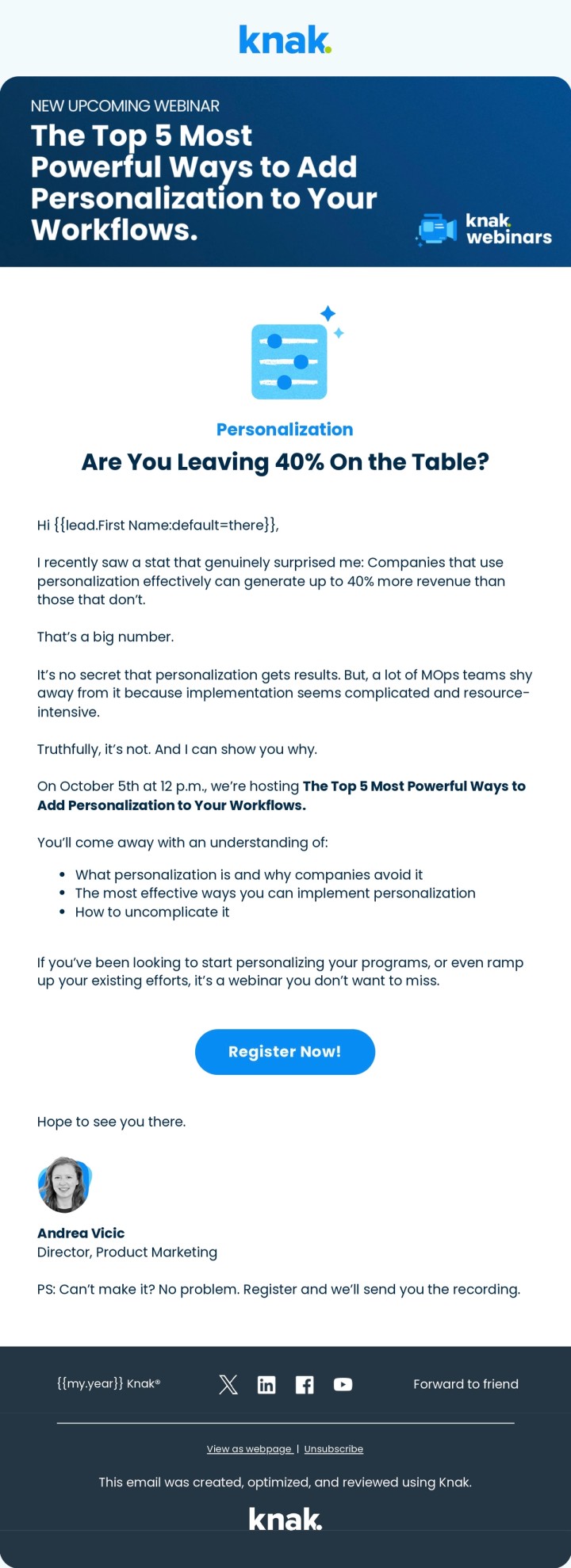
Best practices for the invitation email are to create an enticing hook to take action. For example, tell them what they can expect to learn or take away from the event. Ensure your call to action is prominently displayed. And make sure the email is concise. Don’t forget to include key webinar event details, such as date, time, and registration instructions. A subtle point that is often overlooked is having a consistent experience from email to registration form. Sending users directly to a webinar platform to register isn’t ideal; consider the landing page experience, and make sure you’re providing a cohesive journey from email to form fill.
Below is an invitation email we created for a recent webinar. For a full walkthrough of how we build these, see how we create an event invitation campaign in Knak.
Invitation email subject line examples:
- You’re invited: [webinar title], [date]
- [First name], save your seat for [webinar title]
- Learn [key takeaway] in 45 minutes
- Join [speaker name] live: [topic]
Copy-paste invitation email template:
Subject: [First name], save your seat for [webinar title]
Hi [first name],
On [date] at [time], [speaker name], [speaker title], is digging into [topic] and how teams like yours can [key outcome].
In 45 minutes, you’ll learn how to [takeaway 1], [takeaway 2], and [takeaway 3].
Can’t make it live? Register anyway and we’ll send you the recording.
[Save my seat]
Registration Confirmation Email
The most common mistake with Registration Confirmation email is leaving them in the webinar provider’s default state. Most will send automated emails to confirm registration, and, unsurprisingly, these emails are rarely a good representation of your brand.
In Marketo, for example, you can directly set up an integration with webinar providers to customize the emails that get sent – not just the design, but also when the emails are sent. Open rates on registration confirmation emails as a rule are quite high – most users expect to get this email. So why not use this opportunity to reinforce your brand?
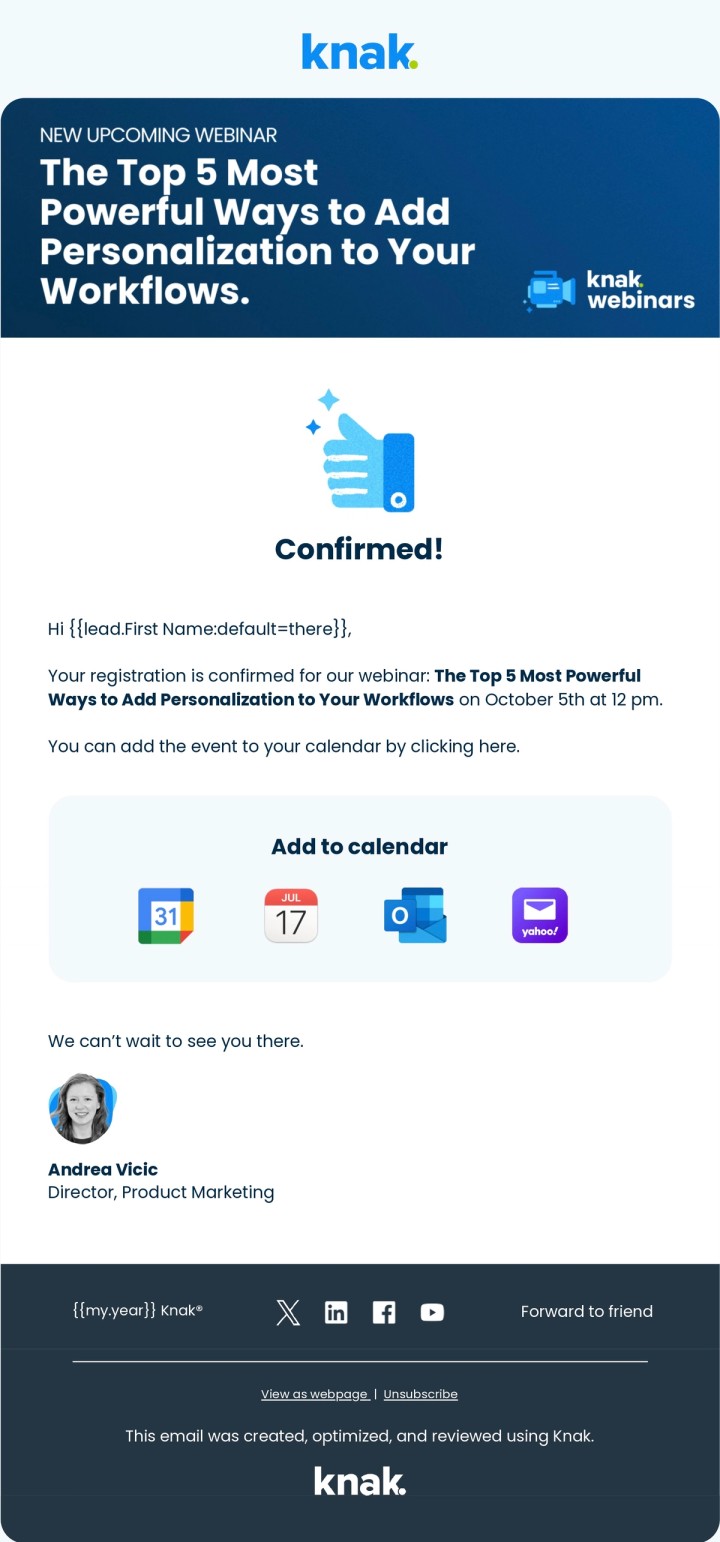
Protip: While there isn’t a solid goal for this email (other than delivering a good experience), we strongly recommend including an add-to-calendar link or module in the confirmation. This is going to make it infinitely easier for them to remember the webinar date and time — and that’s going to improve overall attendance.
Below is an example of what a confirmation email looks like.
What to include in your webinar confirmation email:
- The event date and time, with time zone
- An add-to-calendar link or module
- The join link, or a clear note on when it will arrive
- One line reinforcing what they’ll get out of attending
- A heads-up about the reminder emails to come
Confirmation email subject line examples:
- You’re in! [Webinar title], [date]
- Registration confirmed: [webinar title]
- Your spot is saved for [date]. Add it to your calendar
Copy-paste confirmation email template:
Subject: You’re in! [Webinar title], [date]
You’re registered for [webinar title] on [date] at [time].
Add it to your calendar: [add-to-calendar link]
Your join link will arrive by email the day before the event, and again about an hour before we go live.
In the meantime, here’s what we’ll cover: [one-line agenda].
See you there!
No Open/No Click Reminder Email
Just because they didn’t open it or register for the webinar when you sent the initial registration email doesn’t mean they don’t want to come. They may have missed it, didn’t have the time to read the email, or just need a gentle reminder. Either way, it doesn’t hurt to send a quick reminder to folks that didn’t register the first time. Be sure to use a different subject line. Be brief about what the webinar is about. And try to use some FOMO in your copy; for example: “Last chance to save your spot”.
And don’t worry that a second touch a week or two out is too late. Nearly half of webinar registrations arrive in the final week before the event, so a late reminder catches people while they’re still deciding. Just remember that your subject line and preview text have to earn that second open, so don’t reuse the originals.
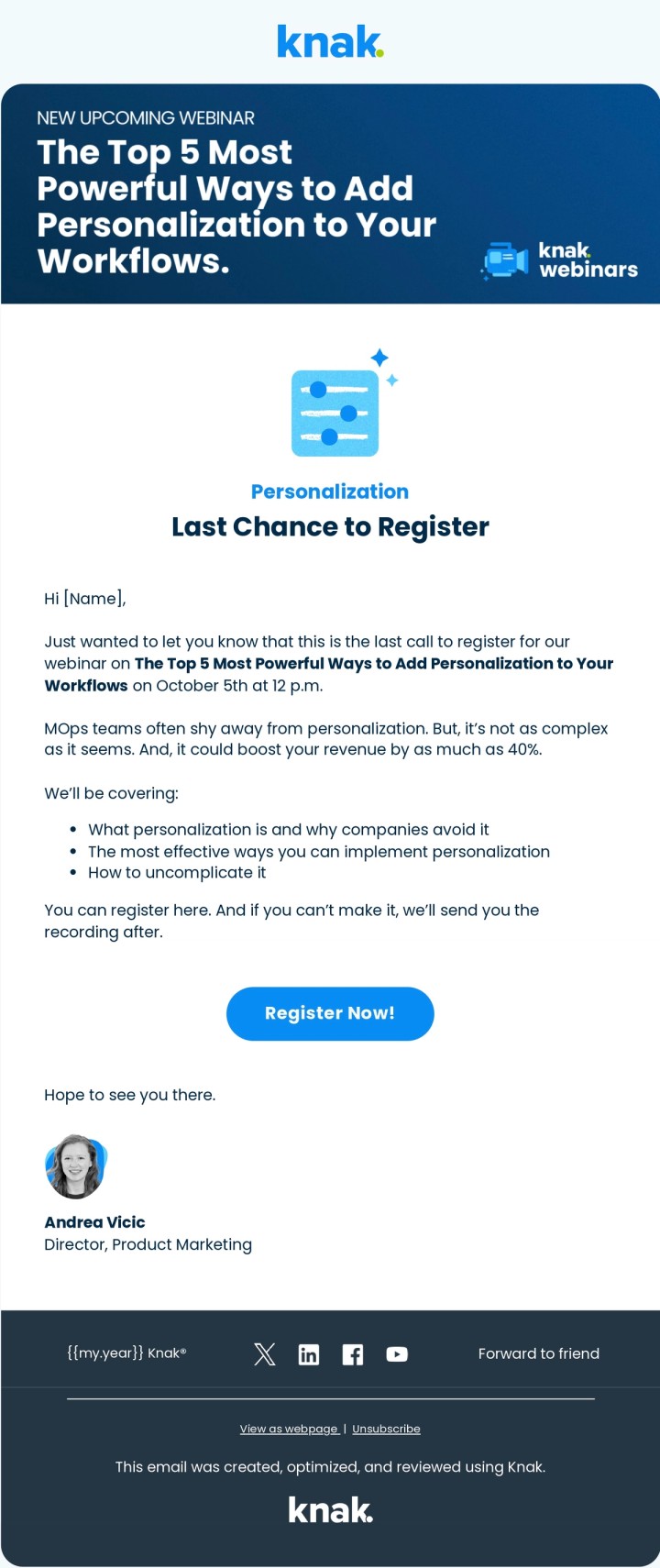
A little bit of FOMO can go a long way!
No open/no click reminder subject line examples:
- Last chance to save your spot
- Still deciding? [Webinar title] is next week
- One week left to register for [webinar title]
- Don’t miss [speaker name] on [topic]
Copy-paste reminder email template:
Subject: Last chance to save your spot
Hi [first name],
[Webinar title] is happening on [date], and registration is still open.
If [problem the webinar solves] is on your plate this quarter, this is 45 minutes well spent: [takeaway 1], [takeaway 2], and a live Q&A with [speaker name].
[Register now]
Day Before Reminder Email
Demand generation vets know the universal truth of webinars: it’s really tough to get people to show up, even if they’ve registered. Current benchmarks put registration-to-attendee conversion at 57% on average, and Livestorm reports an average show-up rate of 47.7%. Those numbers are a lot healthier than the 20 to 30% we all used to plan around, but they jive with what I’ve seen in my career: even a strong webinar loses close to half its registrants between sign-up and showtime.
These rates should (and could) be much higher! Too often the reminder emails are left in the hands of the webinar provider. So users end up getting generic, automated emails with the bare minimum of details. If we’re serious about improving the attendance rate of our webinars, then we should take full advantage of our email marketing capabilities.
Reminder emails should aim to reignite the spark that prompted the prospect to register for the webinar in the first place. What will they get out of attending? Reinforce that effectively, and you’ll see your webinars beat industry benchmarks.
Day before reminder subject line examples:
- See you tomorrow at [time]
- Tomorrow: [webinar title]. Here’s what to expect
- Your join link for tomorrow’s webinar
Copy-paste day before reminder template:
Subject: See you tomorrow at [time]
Quick reminder that [webinar title] is tomorrow, [date], at [time].
Join link: [join link]
Add it to your calendar: [add-to-calendar link]
Bring your questions. [Speaker name] is sticking around for a live Q&A.
Last-Minute or “Starting Now” Email
It’s gameday, and you want to maximize attendance with a “starting now” email. This email may be the most impactful email you send throughout your webinar email sequence. You do not want registrants scrambling to find the “Join Webinar” link at the 11th hour.
It’s important that this email includes key details like the webinar link. In tools like Marketo, you can directly integrate with the webinar provider to fetch and use the webinar link, even if it’s personalized.
As you might have noticed, I’m not a fan of having webinar providers send automated emails. Sure, they are a good way to foolproof your campaign if you’re short on resources. But why outsource your branding to another platform? Your webinar sequence represents a great opportunity to connect with your audience and, critically, make sure they have all the event details right.
Below is an example of a day-of email letting you know the webinar is about to go down.
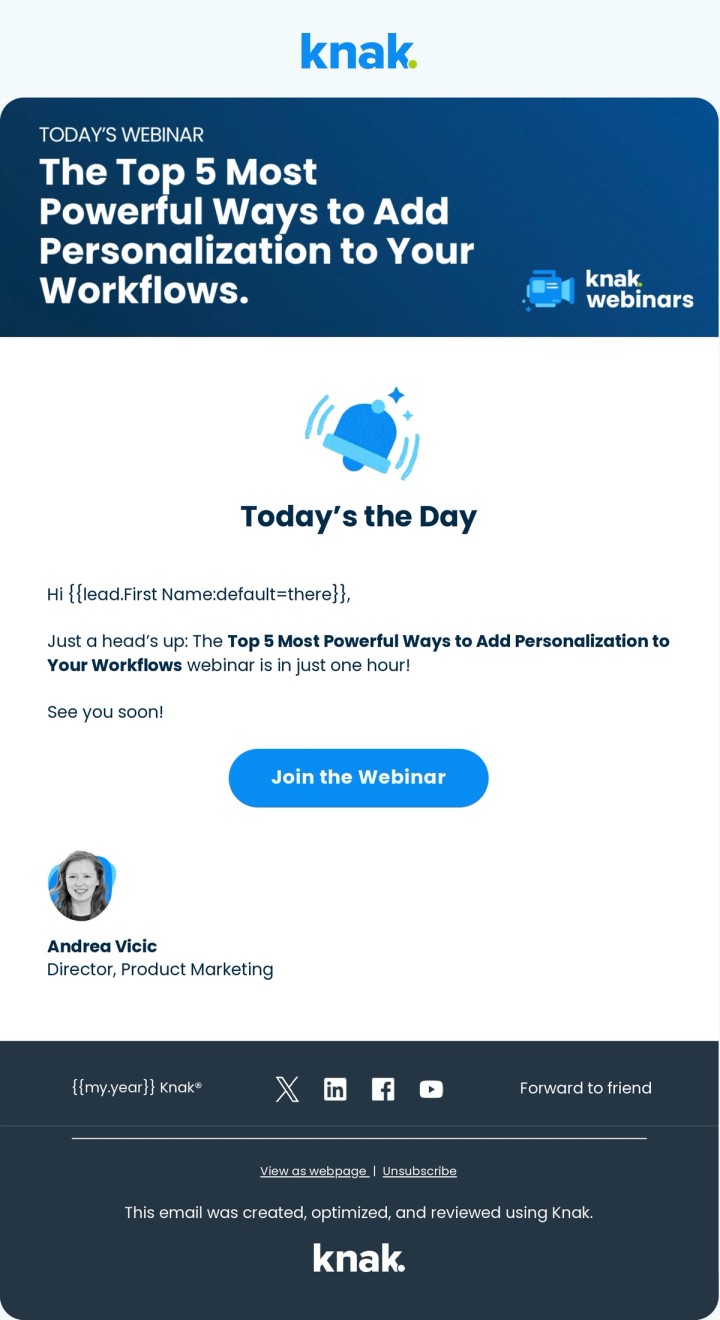
Starting now subject line examples:
- We’re live in 15 minutes
- [Webinar title] starts now. Here’s your link
- Starting soon: [webinar title]
Copy-paste starting now email template:
Subject: [Webinar title] starts now. Here’s your link
We’re live! Join us now: [join link]
If you can’t make it after all, no stress. We’ll send the recording to everyone who registered.
Follow-up or Thank You Email
If the live webinar event was a meal at a restaurant, it’d be the main course. The lead up to the event – all the emails and digital marketing – are the appetizer. So, the follow-up email is like dessert; a fitting way to cap off a great experience. And, just like dessert, it can leave a lasting impression that carries well beyond the current meal.
When it comes to your webinar email sequence, take extra care with your follow-up/thank you emails. The value you provided during the webinar experience should carry through to your follow up. The event follow-up email is the most often overlooked, and that’s unfortunate because it’s a great opportunity to finish the experience on a high note.
As a best practice, send all registrants a video-on-demand link to the webinar – life happens, and sometimes would-be attendees can’t make the live event. Many registrants will sign up simply to get the VOD, and there’s nothing wrong with that.
One more reason to take the follow-up seriously: ON24’s 2025 benchmark data shows that 45% of attendees chose to watch on-demand rather than live. Your recording email is not an afterthought. For nearly half your audience, it is the webinar.
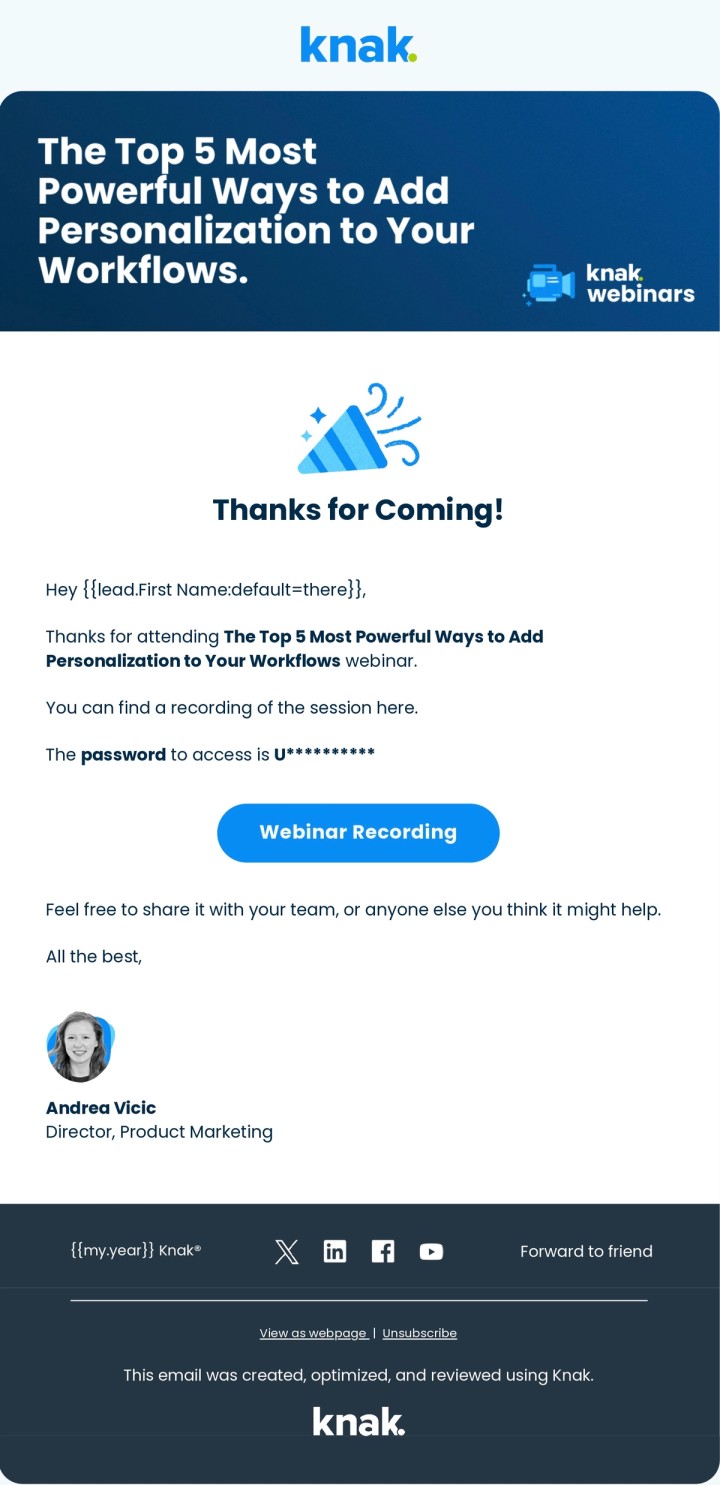
Don’t forget to say thanks!
The Attendee Thank You Email
Send this to everyone who attended live, within a day or two of the event. Thank them, link the recording and any resources you promised, and give them one clear next step, whether that’s a demo, a related guide, or the next session in the series.
The No-Show and Recording Email
Registrants who didn’t attend aren’t lost. Many signed up fully intending to watch the recording on their own time. Send them a separate email that leads with the on-demand link, skips the guilt trip, and keeps the door open for the next event.
Follow-up email subject line examples:
- Here’s your recording of [webinar title]
- Thanks for joining us, [first name]
- Missed [webinar title]? Watch it on demand
- [Webinar title]: Slides, recording, and next steps
Copy-paste follow-up email template:
Subject: Here’s your recording of [webinar title]
Thanks for joining us for [webinar title]!
Here’s the on-demand recording: [recording link]
And the resources we mentioned: [resource links]
If you’d like to go deeper on [topic], [next step: book a demo, read the guide, or register for the next session].
For the no-show version, swap the opener for something like “Sorry we missed you” and lead with the recording link. Skip the thank-you for attending; people notice.
Feedback or Survey Email
While you could argue that sending a feedback or survey email after every webinar isn’t necessary, it certainly isn’t a bad idea to incorporate this into your campaign playbook. Perhaps you only send feedback emails to users after they’ve attended their first webinar with you, or time it and send every other webinar.
The feedback email demonstrates that you are actively listening to your audience and keen to continue delivering value. You can keep it simple with a rating system so it only takes a single click to give feedback, or you could invite direct feedback via a reply-to.
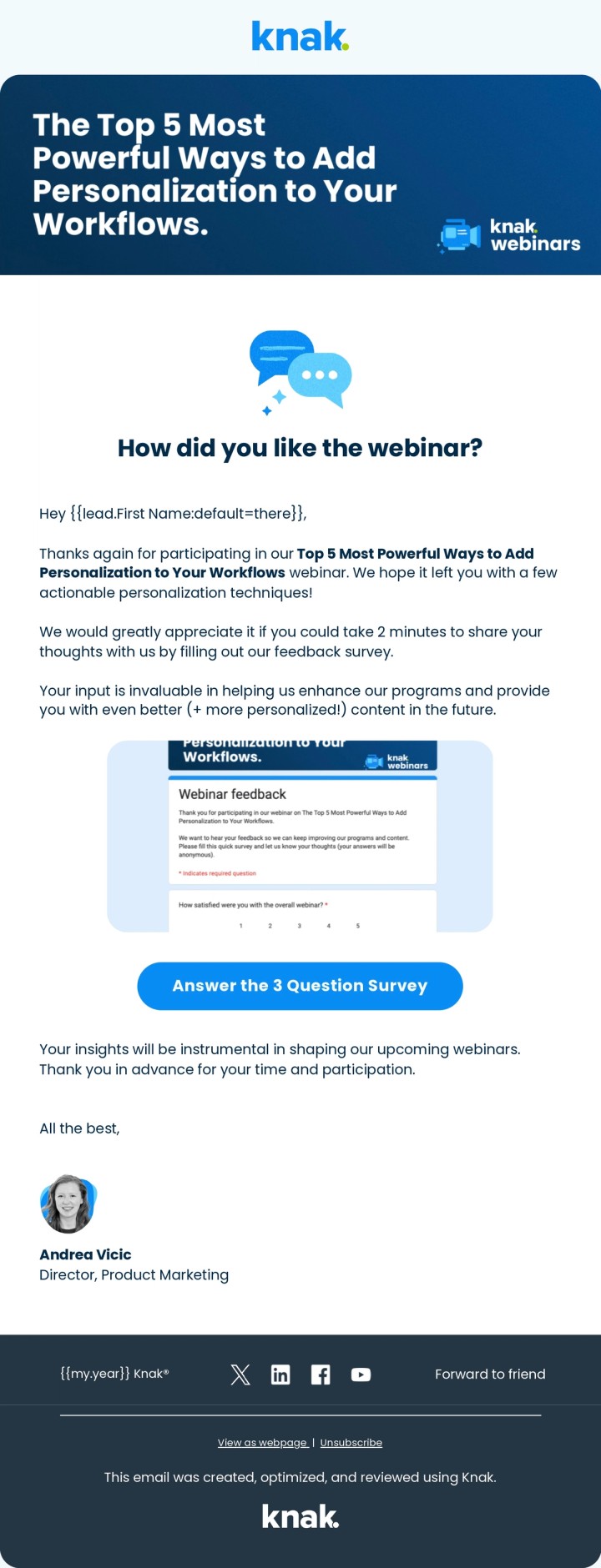
Getting feedback means better future webinars!
Feedback email subject line examples:
- One question about [webinar title]
- How did we do?
- 30 seconds of feedback on [webinar title]
Copy-paste feedback email template:
Subject: 30 seconds of feedback on [webinar title]
How was [webinar title]?
Rate it in one click: [1] [2] [3] [4] [5]
Got a topic you want us to cover next? Hit reply and tell us. We read every response.
A Note on Timing
How long before the event do you send the first invite? How about the reminder to those who didn’t open? And how soon do you follow-up afterwards? One benchmark worth anchoring to: Livestorm found that 49.6% of registrations happen in the final week before the event, and 15.3% land on the day itself. Your sequence should stay active right up to showtime. Let’s break that down:
Email Type | Timing |
|---|---|
Initial Invite | 2 – 4 weeks prior |
Confirmation | Within an hour of registration |
No Open/Click Reminder | 1 – 2 weeks prior |
First Reminder | 1 week prior |
Gameday Reminder | Within an hour prior to the event |
Thank You Email | Within a 3 days after the event (as soon as the video recording is ready) |
Survey/Feedback | Within a week after the event |
Webinar Email Mistakes to Avoid
Most webinar email problems are not copy problems. They’re sequence problems. These are the mistakes we see most often:
- Leaving emails in the webinar provider’s default state. Automated confirmations and reminders from the provider are rarely a good representation of your brand, and you give up control of send timing. Integrate the provider with your marketing automation platform and send your own.
- Stopping after the invitation. Nearly half of registrations arrive in the final week before the event. If your sequence goes quiet after the first send, you’re leaving registrations on the table.
- Closing registration early. With 15.3% of registrations landing on the day of the event, keep the form open right up to showtime.
- Sending the recording only to attendees. With 45% of attendees choosing on-demand viewing, registrants who missed the live event are recording viewers, not lost leads.
- Skipping the add-to-calendar link. The confirmation email’s one job is making sure the event lands on the registrant’s calendar.
- Reusing the same subject line on every reminder. If the first subject line didn’t earn an open, the second send needs a different angle. An AI subject line generator makes variants cheap to produce and test.
How Knak Makes Your Webinar Campaign Even Easier
While this post aims to make your email sequence straightforward, we know that building campaigns within enterprise-grade marketing automation platforms (MAP) is anything but. Knak takes the building part out of your MAP and into a no-code platform that makes it easy, lets you to set up brand guardrails, and allows for simple personalization and localization. Then you use your MAP to plan and send your campaign. That means getting your emails to market up to 95% faster. Visit us to learn more.
Types of Webinar Emails FAQ
How many types of webinars are there?
There are 9 types of webinars:
- Educational webinars
- Product demo webinar
- Workshops or training webinars
- Panel discussions
- Q&A or AMA webinars
- Thought leadership webinars
- Sales webinar
- Hybrid webinars mixing in-persona and virtual components
- Webinar series
What should a webinar confirmation email say?
Your webinar confirmation email should thank users for registering for your event, provide or reiterate key details about the event's date and time, and information about how to attend the event. You can also take this opportunity to set expectations about future reminder emails, and reinforce what the webinar is about.
How do I follow-up on a webinar?
Your webinar follow-up email should thank the person for attending, give them access to any follow-up resources (such as PDFs, etc), and invite feedback about the webinar. You may also include a call-to-action like offering a free trial to your product or a personalized sales demo.
What type of program should I use for webinars in Marketo?
Use the "Event Program" in Marketo to run your webinar campaigns. This program type is designed for webinars and has features to allow you to directly integrate with a webinar provider to track and register your webinar registrations.
How many webinar reminder emails should you send?
Three reminders is a solid default for most webinars: a no open/no click reminder one to two weeks out, a day before reminder, and a starting now email as the event goes live. Nearly half of registrations arrive in the final week, so late-sequence sends work with your audience’s timing, not against it.
What should a webinar follow-up email include?
A webinar follow-up email should include a thank-you, the on-demand recording link, any resources promised during the session, and one clear next step such as a demo or related content. Send no-shows a separate version that leads with the recording link instead of the thank-you.