


What is an Email Template Builder?


Email marketing is a carefully choreographed series of steps. To the outsider, it looks like one fluid motion. To anybody in marketing operations or demand generation, you know that an email has a lifecycle of its own. The foundation of modern email marketing is the usage of email builders or template builders.
What is an Email Template Builder?
An email template builder is a tool that helps you create, customize, design and deploy your emails through a no-code interface. While we often think about the no-code interface component of template builders, modern email builders are effectively orchestration platforms. They help connect the dots from various systems to ensure that the whole email workflow is smooth and effective.
Email builders integrate with project management and design tools to allow collaboration and communication around the email, then handle distribution to the email platform you're sending from. For an enterprise, this might be Marketo or HubSpot.
Email builders use drag-and-drop functionality to help users assemble emails and share them around. Instead of having to code HTML and CSS by hand, you now have the ability to put an email together in a very modular format. It's like putting building blocks together.
Most enterprise builders offer three editing modes to serve different user needs. The Design Editor provides the visual drag-and-drop interface most marketers use. The Plain Text Editor handles simple, text-only emails. The Code Editor lets developers work directly with HTML and CSS for advanced customization. Modern builders support hybrid editing, where you can design visually and then drop in custom HTML elements without losing your work. This flexibility means your design team and your developers can work in the same platform without stepping on each other.
The template part is really important because this is not just building one-off emails but building templates that can be reused over and over again. Think of setting up webinar emails. You would want to have the ability to set a webinar template and then distribute that to your marketing team who could then update the content and personalize it.
What problems does an email template builder solve?
An email template builder replaces the need for a dedicated email designer on staff. It decouples you from reliance on native MAP editors which often aren't as feature-rich or integrated into your martech stack. And it helps your team coordinate and collaborate more effectively.
Email builders break the creation bottleneck
The time savings are substantial. Teams using enterprise builders report cutting email creation cycles from days to hours, with some building complete emails in 30 minutes rather than the hours it used to take. This acceleration happens because you're no longer recreating common elements for each campaign. You're leveraging pre-built, reusable modules stored in your design system.
Tools like Knak provide brand guardrails, allowing a greater number of people on your team to create emails. This moves email marketing development out of the development and design world and firmly into the marketer's realm.
Brand consistency at scale with email builders
For distributed teams operating across multiple regions or brands, maintaining consistency becomes a major challenge. Email builders address this through centralized governance features:
- Brand kit management: Your colors, fonts, and logos all in one place
- Locked template sections: Prevent off-brand modifications to critical elements
- Shared component library: Pre-approved modules your whole team can use
These guardrails prevent the brand fragmentation that happens when designers work independently without structure.
Streamlining QA and approvals with email builders
Consider the process of approving an email when it's being screenshot and shared in Slack or over email. The back-and-forth required is challenging. Not only that, but once you start testing the live email, you discover responsiveness isn't working or the email isn't rendering correctly for a certain email service provider.
The QA process alone can derail timelines. You send test emails to yourself across different devices, checking how the email looks in Gmail versus Outlook versus Apple Mail. You discover that what looked perfect in your design tool is broken in Outlook 2016 because legacy email clients don't support modern CSS. Now you're back to the developer asking for fixes, which kicks off another round of revisions and approvals.
An email builder is designed not only to produce effective, responsive, correct code for email (which any email developer would know is quite challenging), but it also serves as an orchestration layer for communication across different tools.
The other benefit is closing the feedback loop. Having collaboration centered around the actual email and being able to pre-render it and see how it will really look for customers is a game changer. When this works within your existing workflows (whether you're using project management tools like Asana or Monday to communicate status, or even just a Google spreadsheet), you can move that into a centralized platform where feedback will be seen and acted on in the context of the email.
How email template builders work
The term email builder itself is somewhat vague. You might instantly think of using an email marketing tool to quickly put together an email. In the context of what we're discussing here, we're talking about enterprise-grade email builders. These are the builders that integrate with your marketing automation platform and will be used by potentially hundreds of users.
Email builders work by overlaying your already existing email marketing process. You create the email in a single platform like Knak, and then you have the ability to ship that anywhere. This allows you to have this asset independent of your marketing automation system, which makes it easier to get feedback. You're not asking somebody to sign into Marketo just to look at an email.
Email builder integrations across your martech stack
Enterprise email builders connect with multiple systems across your workflow:
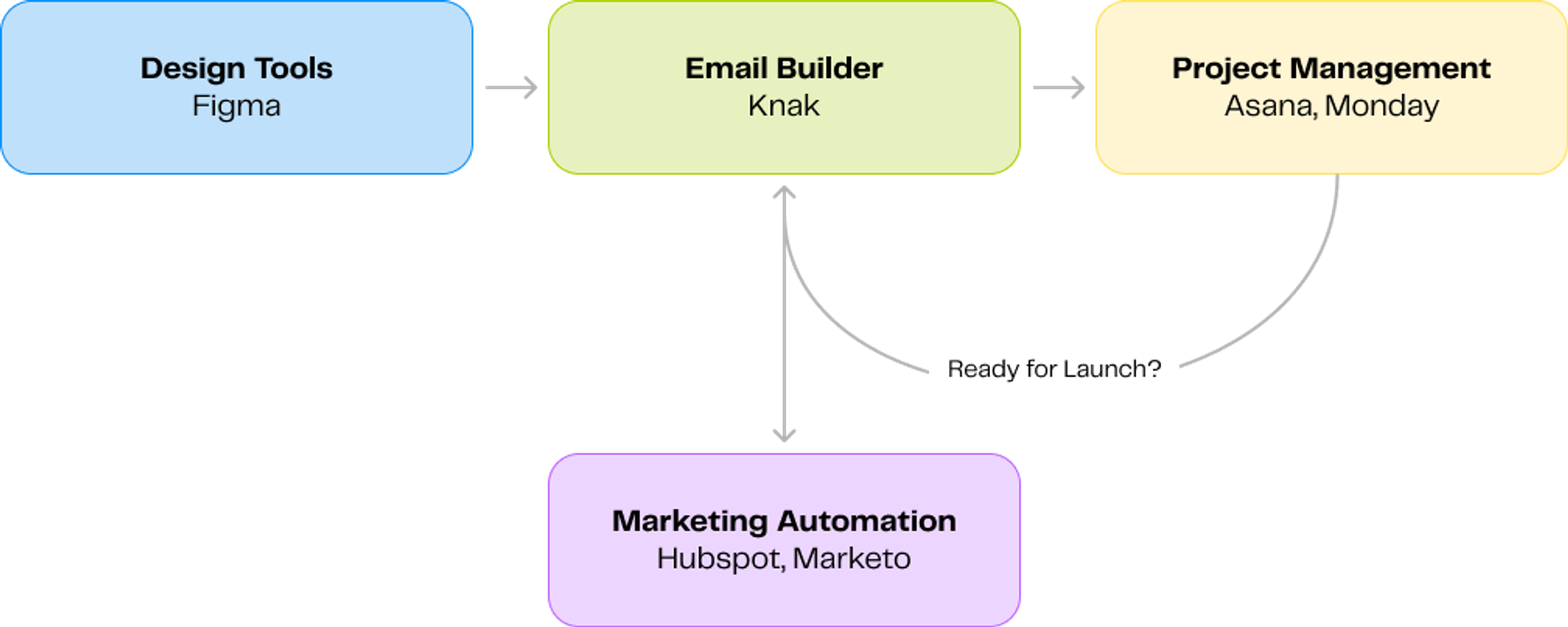
They connect with tools like Figma to help translate design into email. They coordinate with project management tools, providing a UI and message line of communication for stakeholders to collaborate. Then, with an integration with your marketing automation platform, like Marketo or HubSpot, allow you to get that email out to your audience.
Email builder modularity: snippets, partials, and components
Modularity is where email builders really shine. Enterprise platforms support three levels of reusability:
- Snippets: Tailored to specific emails, like a CTA button you're using for one campaign
- Partials: Consistent across multiple emails, like your standard footer with legal links and unsubscribe
- Components: Global content modules with properties and variants. When you update a component, all emails using it automatically reflect the change.
This eliminates the manual template maintenance that used to consume hours of your team's time.
Platform independence with email builders
Choosing an email builder for your enterprise isn't just about finding a tool with drag-and-drop functionality. The right platform needs to integrate with your existing martech stack, support your team's collaboration patterns, and scale as your organization grows.
When evaluating builders, focus on capabilities that directly impact your team's velocity and the quality of emails you're shipping. Here are the key features that separate enterprise-grade builders from basic email tools.
Feature | What to Look For |
|---|---|
Visual design capabilities and code quality | Clean, modern HTML that renders consistently across email clients, including legacy Outlook versions, with responsive design testing built into the design experience |
Modularity and reusability | Three levels of reusability (snippets for specific emails, partials for consistent elements, components for global modules) where updates automatically cascade across all emails |
Personalization and dynamic content | Conditional logic for show/hide rules, repeatable blocks for personalized lists, merge fields for CRM data, and AI-assisted content generation |
Collaboration and approval workflows | Comment threads, explicit approval routing, version control, granular permissions, and audit logs tracking every edit |
Integration architecture | Native connectors or APIs for your ESP, CRM, and marketing automation platform, with clean HTML export for broad compatibility |
Deployment model flexibility | Support for standalone, embedded SDK, or white-label deployments depending on your infrastructure needs |
Testing and quality assurance | Inbox preview across devices and clients, responsive visualization, test send functionality, spam filter testing, and plain text generation |
Compliance and security | SOC 2 certification, GDPR and CAN-SPAM compliance features, consent management, encryption, role-based access controls, and audit trails |
Team spaces and multi-brand support | Unlimited team spaces with isolated permissions, shared asset libraries per team, and localization support for multiple languages |
Feature | Visual design capabilities and code quality |
|---|---|
What to Look For | Clean, modern HTML that renders consistently across email clients, including legacy Outlook versions, with responsive design testing built into the design experience |
Feature | Modularity and reusability |
|---|---|
What to Look For | Three levels of reusability (snippets for specific emails, partials for consistent elements, components for global modules) where updates automatically cascade across all emails |
Feature | Personalization and dynamic content |
|---|---|
What to Look For | Conditional logic for show/hide rules, repeatable blocks for personalized lists, merge fields for CRM data, and AI-assisted content generation |
Feature | Collaboration and approval workflows |
|---|---|
What to Look For | Comment threads, explicit approval routing, version control, granular permissions, and audit logs tracking every edit |
Feature | Integration architecture |
|---|---|
What to Look For | Native connectors or APIs for your ESP, CRM, and marketing automation platform, with clean HTML export for broad compatibility |
Feature | Deployment model flexibility |
|---|---|
What to Look For | Support for standalone, embedded SDK, or white-label deployments depending on your infrastructure needs |
Feature | Testing and quality assurance |
|---|---|
What to Look For | Inbox preview across devices and clients, responsive visualization, test send functionality, spam filter testing, and plain text generation |
Feature | Compliance and security |
|---|---|
What to Look For | SOC 2 certification, GDPR and CAN-SPAM compliance features, consent management, encryption, role-based access controls, and audit trails |
Feature | Team spaces and multi-brand support |
|---|---|
What to Look For | Unlimited team spaces with isolated permissions, shared asset libraries per team, and localization support for multiple languages |
Email builder case study
Google Cloud's Demand Operations team faced massive bottlenecks in their email creation process. Their marketers were stuck in what they called a "change request death loop." Every email required multiple rounds of revisions, with feedback scattered across Slack messages, email threads, and screenshots. By the time an email finally launched, the team had burned significant time on back-and-forth coordination rather than strategy and creative work.
After implementing an enterprise email builder, Google saw a 90% reduction in change requests at launch. The platform consolidated building, testing, and reviewing into one location, allowing marketers to make changes autonomously rather than waiting on developers or designers. This shift freed the team to focus on campaign strategy instead of getting trapped in revision cycles. Beyond velocity improvements, Google avoided over $2 million in incremental costs by eliminating the need for additional specialized resources as their team scaled.
The platform rolled out to approximately 250 marketers within Google Cloud, with adoption spreading quickly due to its ease of use. One marketer reported building three emails and a landing page in less than an hour. Knak's brand guardrails allowed Google to democratize email creation across a larger team without sacrificing consistency or quality. The combination of no-code design capabilities, integrated collaboration tools, and seamless MAP integration transformed Google's email workflow from a bottleneck into a scalable operation.