


Email Template Management for Large Marketing Teams


Somewhere in your organization, there's a folder with seventeen versions of the same email template. Nobody remembers which is current. Three of them have outdated legal copy. One has the old logo. At least two are actively being used by different teams.
This is template sprawl, and it happens to every marketing organization that scales past a handful of people creating emails.
The challenge isn't design. It's operations. How do you organize templates so fifty marketers across three regions can find what they need? How do you update a template that's being used in live campaigns? How do you retire templates without breaking existing workflows?
Forty-four percent of marketing ops teams have just two to five people. Twenty-six percent are solo practitioners. Small teams managing large template libraries is the norm, not the exception. Template discipline becomes a force multiplier. Its absence becomes a constant drag.
When email template sprawl becomes template chaos
The symptoms are recognizable. Duplicate templates proliferate when someone can't find what they need and creates a new one; the next person can't find either, so they create a third. Each lives in a different folder, named slightly differently, and diverges over time. Version confusion creates risk when marketing sends an email with outdated pricing, old branding, or expired legal language, not because they intended to, but because they grabbed the wrong version.
Tribal knowledge becomes the lookup system. "Ask Sarah which template to use for product launches" isn't documentation; when Sarah goes on vacation, the institutional knowledge goes with her. Regional variants fragment the library further: the EMEA team needs French copy, APAC needs a different footer for compliance, and instead of systematic localization, each region creates their own copy and modifies it independently.
Sixty-one percent of marketing ops professionals cite organizational silos as their primary barrier to strategic impact. Template sprawl is a symptom of silos. When teams can't coordinate around shared assets, they create their own. The library fragments.
The cost isn't just inefficiency. It's brand inconsistency, compliance risk, and the slow accumulation of technical debt that makes every future change harder.
The anatomy of enterprise email template governance
Effective template management balances two competing needs: consistency (every email looks and feels like your brand) and flexibility (marketers can create without waiting for design approval every time).
Jacqueline Freedman, founder of Monarch Advisory Partners, describes the solution as "locked templates and pre-approved blocks." The concept is straightforward: some elements are fixed; others are flexible.
Locked elements enforce brand and compliance standards automatically: header design, footer content, legal copy, unsubscribe links, logo placement. These don't change between emails and shouldn't require review every time because they were approved once at the template level. Pre-approved blocks give marketers creative options within boundaries through a library of headline styles, image treatments, CTA buttons, and content modules, all pre-approved, all brand-compliant. Marketers compose emails by combining blocks, not by designing from scratch. Flexible zones allow customization where it adds value: body copy, images, personalization tokens, dynamic content rules. The template defines where flexibility is allowed; marketers operate within those zones.
This architecture makes governance operational. Instead of reviewing every email for brand compliance, you review templates and blocks once. Individual emails inherit that approval.
"Governance is the boundary: who can use what data, what's permitted to be sent, and the audit trail that proves it," Freedman explains. Template governance makes those boundaries visible and automatic.
April Mullen, Sr. Manager and Head of Content Marketing at Impel, describes a practical framework for calibrating that balance. "A common approach is what I call the 80/20 model," she explains. "Roughly 80 percent of the email structure is standardized, while 20 percent is flexible through approved modules and optional layouts. Marketers can move quickly by assembling content blocks instead of designing layouts from scratch."
The principle is simple but often resisted: "Do not give teams freedom over fonts, colors, or layout rules," Mullen advises. "Give them freedom over how approved components are combined and how content is expressed within those components."
Organizing templates at scale
A template library is only useful if people can find what they need. At scale, organization becomes critical.
Naming conventions need to be intuitive enough that someone encountering them for the first time can navigate without a guide. Include the essential information: business unit, use case, version, and status. A pattern like [Business Unit] - [Use Case] - [Version] - [Status] gives you Marketing - Product Launch - v3 - Active. Verbose, but unambiguous. When someone searches the library, they know immediately what they're looking at.
Folder structures should reflect workflows, organized by how marketers work rather than how templates were created. If teams think in terms of campaign types, organize by campaign type; if they think in terms of audience segments, organize by segment. Match the mental model of your users. A common pattern uses top-level folders for business units, second-level for use case categories (lifecycle, campaigns, transactional), and third-level for specific programs. Deep hierarchies are fine if they're logical; shallow hierarchies with hundreds of templates at each level aren't.
Metadata handles what folder structure can't. Tag templates with attributes that don't fit in the folder path: region, language, product line, creator, last modified date, approval status. When someone searches for "EMEA product launch template," they should find it. And when templates are no longer active, archive rather than delete. Move them to an archive folder that's accessible but clearly separate; keep them because someone will inevitably ask about "that email we sent last Q3.”
Version control without the headaches
Templates evolve. Legal requirements change. Branding updates. Product names shift. A template that was correct six months ago might need updates today.
Version control for templates follows different rules than version control for code.
Major versions apply to structural changes: when the template layout changes, when locked elements update, when the fundamental structure shifts. The previous version continues to exist because active campaigns might depend on it. Minor versions cover content updates: when copy changes, images update, or styling adjusts within the existing structure. The template ID stays the same; the content updates in place.
The hard question is propagation: when you update a template, what happens to emails already using it? Options range from "nothing changes until manually updated" to "all instances automatically inherit the new version." The right answer depends on your compliance requirements and operational preferences. For locked elements like legal copy, automatic propagation typically makes sense because you want the update everywhere. For flexible elements, manual propagation might be safer because you don't want to overwrite campaign-specific customizations.
Every change to a template should be logged: who changed what, when, and why. When a compliance question arises six months later, the audit trail answers it. This isn't bureaucratic overhead; it's operational necessity for regulated industries.
The email template retirement problem
Creating new templates is easy. Retiring old ones is hard.
The challenge: templates accumulate dependencies. A template might be referenced in automated programs, scheduled campaigns, or documentation. Retiring it breaks those dependencies.
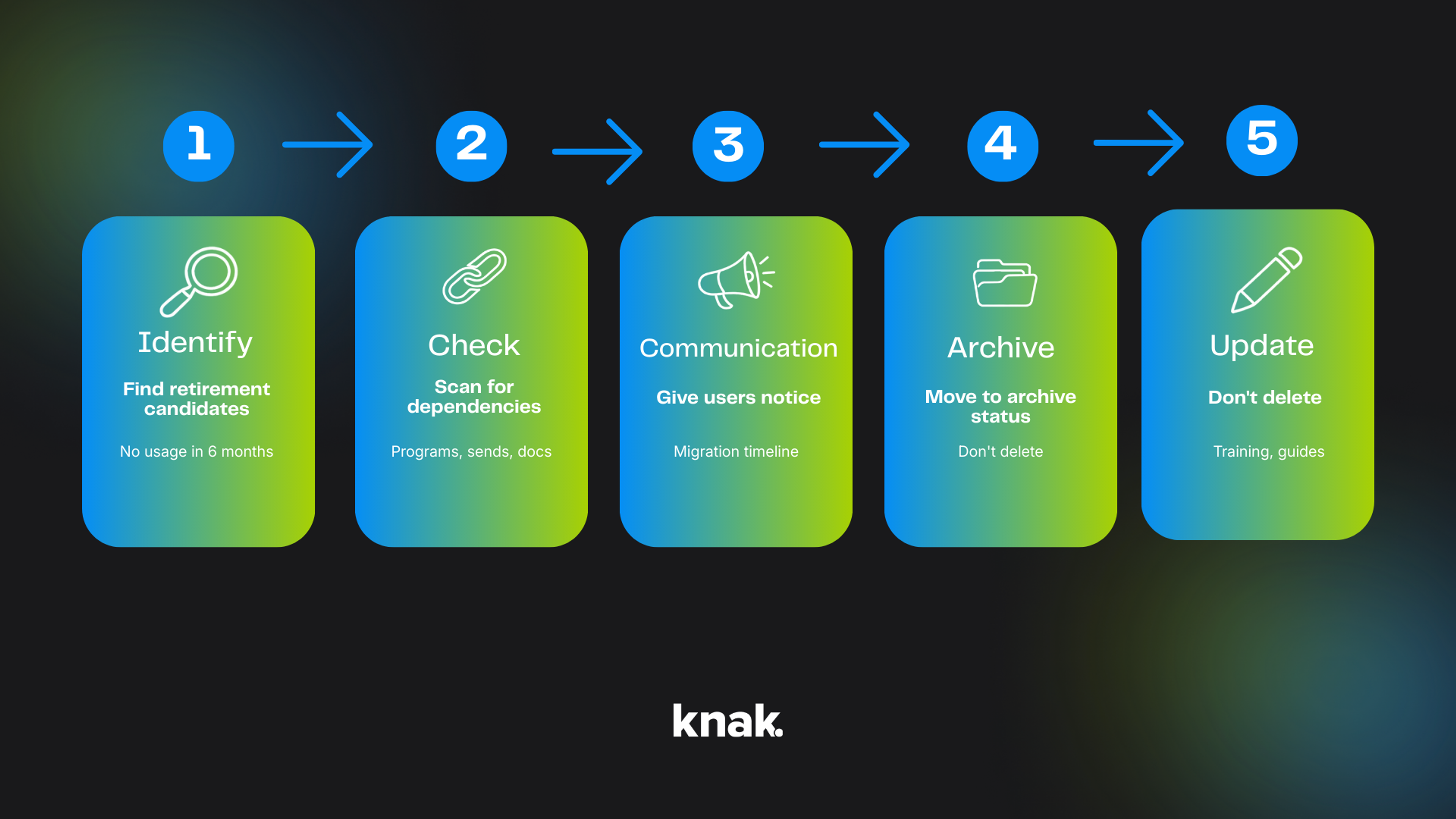
Retirement workflow:
- Identify candidates. Templates that haven't been used in six months, that have been superseded by newer versions, or that no longer match brand guidelines are retirement candidates.
- Check dependencies. Before retiring, scan for active usage. Which programs reference this template? Which scheduled sends depend on it? Which documentation points to it?
- Communicate the timeline. Give users notice. "This template will be retired on [date]. Migrate active programs to [replacement template] before then."
- Archive, don't delete. Move to archive status rather than destroying. The template stops appearing in active libraries but remains accessible for reference and compliance purposes.
- Update documentation. Any process documents, training materials, or guides that reference the retired template need updates.
The retirement process takes more effort than template creation. Plan for it.
Mullen adds that the strongest governance models use "shared ownership with a single accountable owner." Brand or creative teams define visual standards. Marketing operations owns the template system itself — code quality, compatibility, versioning, QA, and release management. Channel owners provide requirements based on real-world use cases. "The goal is not control for its own sake," she says. "The goal is to create a system where marketers trust the templates enough that they can move quickly without second-guessing whether they are putting the brand at risk."
What email template governance looks like in practice
The operational impact of disciplined template management shows up in measurable results. Forbes built their first fully bespoke landing page entirely without developers using Knak's template system — design components created once, synced from Figma, and reused with confidence across campaigns. The result: a 2x increase in conversion rate, 90% reduction in time per asset, and 18,000 hours saved annually across development and product teams.
That's the return on template discipline. When brand standards are baked into the system and marketers can assemble rather than design from scratch, the time savings compound at enterprise scale.
Balancing control with creative flexibility
Template governance fails when it becomes a constraint on creativity. If every email looks identical because the system is too rigid, you've traded one problem (inconsistency) for another (boring sameness).
The art is in the zones. Locked elements handle brand consistency automatically. Flexible zones allow genuine creative expression where it matters.
Identify where creativity adds value: headlines, hero images, body copy, storytelling structure. These benefit from creative variation, and each campaign should feel fresh while remaining recognizably on-brand. Then identify where consistency is non-negotiable: legal compliance, accessibility requirements, brand marks, core messaging. These shouldn't vary; lock them down and stop reviewing them.
The middle ground is the pre-approved block library. Thirty headline styles, twenty image treatments, fifteen CTA variants gives marketers hundreds of combinations, all pre-approved, all brand-compliant. Creative variety within governance boundaries. This approach shifts creative energy to where it belongs: campaign strategy and messaging, not template recreation.
Measuring email template health
Template libraries need ongoing maintenance. Without measurement, entropy wins.
Track template usage rates to see which templates are actually being used. Templates with zero usage in six months are retirement candidates; templates with heavy usage need priority attention for updates and improvements. Monitor time to find as well: how long does it take a marketer to locate the right template? If search takes more than thirty seconds, the organization system needs work. Track support requests and questions about template locations as leading indicators.
Version drift reveals how many templates are out of date. A quarterly audit comparing active templates against current brand guidelines surfaces version debt before it becomes brand inconsistency. Error rates matter too: how many emails go out with incorrect template elements? Errors point to governance gaps, whether from unclear locked/flexible boundaries or training issues.
These metrics inform decisions about where to invest in template infrastructure.
Making email template management invisible
The best template management systems disappear. Marketers don't think about "managing templates." They think about building campaigns. The governance, organization, and version control happen in the background.
That invisibility requires integration. The template library should live where marketers work, not in a separate system requiring export-import workflows. Search should be instant. Filters should surface the right template in seconds. Version updates should propagate without manual intervention.
The content supply chain perspective helps here: templates are a stage in a larger workflow from design to deployment. When that workflow is connected, with design tools feeding creation platforms feeding marketing automation, template management becomes a natural part of the flow rather than a separate discipline.
For marketing ops teams managing thousands of emails across global organizations, this integration is the difference between template management as a burden and template management as infrastructure.
Knak's template library is built around these principles: locked elements for brand consistency, flexible zones for creative variation, version control that works automatically, and tight integration with the creation workflow. See how enterprise teams are building template systems that scale.